Archive, backup retention, replication and WORM are different scopes. A visible policy field does not establish an operational archive data path, tape or cold-tier support across every platform. Validate installed-release and target support with support.
Screenshots were captured from the actual lab interface on 16 October 2026. The interface is in English; explanations follow your selected language. Resource names, dates and settings are examples; use values for your own environment.
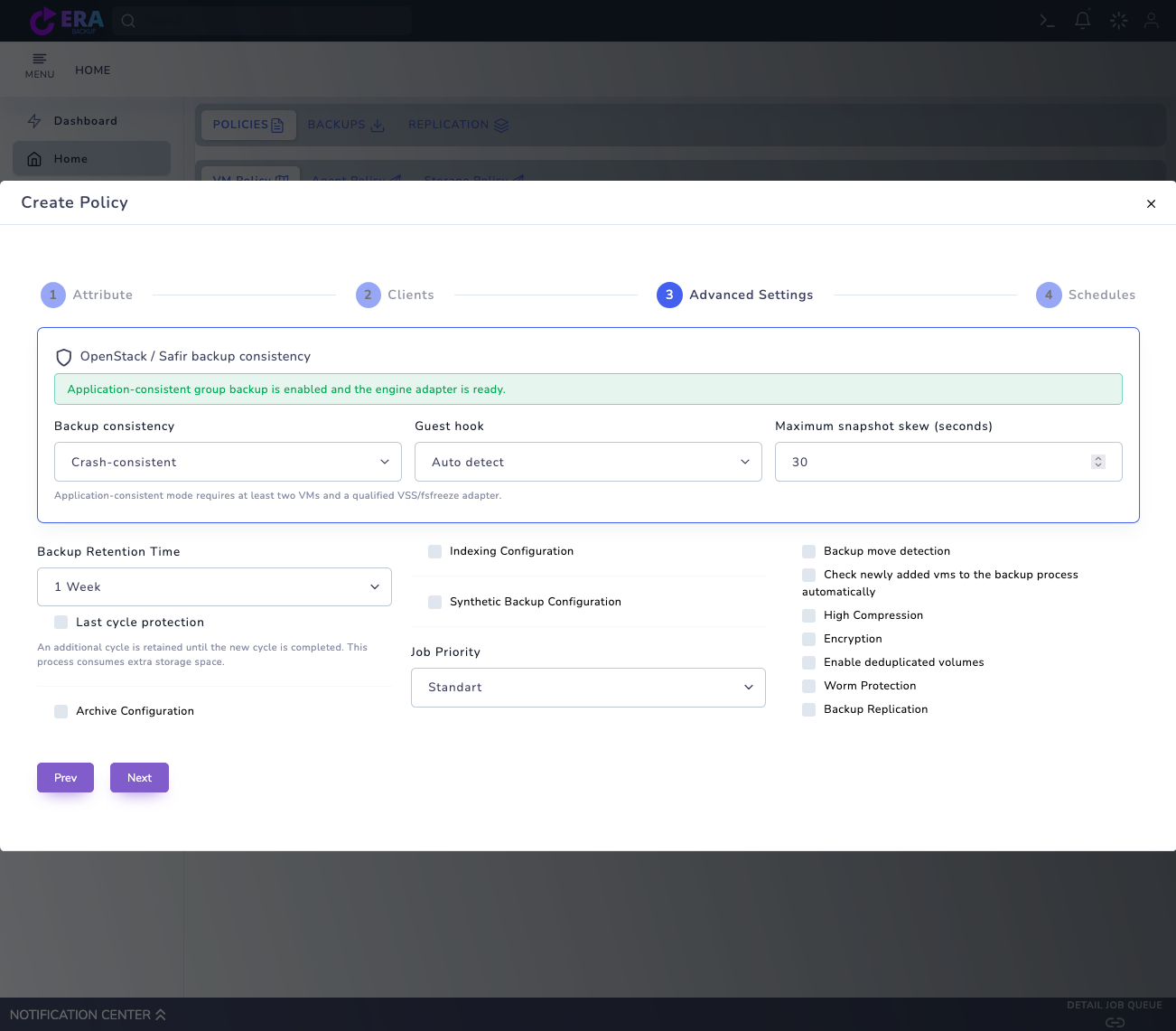
Visual note: the earlier real Advanced Settings draft is reused; Archive Configuration is unchecked. It does not show an expanded Archive Storage selection or a new archive job. This work changed no policy, retention or data and ran no archival, deletion or restore.
Data owner, business need and approved retention plan
Product release, method and target support
Capacity, access and recovery dependencies
Isolated restore and periodic acceptance plan
01
1. Define the archival requirement
Agree which data must be retained, why and for how long with the data owner. Treat an archive copy separately from moving or deleting source data. Do not assume the Archive option automatically cleans up source files.
Expected result
Scope, responsible owner and acceptance results are documented.
02
2. Verify method and target support
Validate the archive flow with support for the platform, data type and release. Do not assume support for every disk, object-storage, tape or cold-tier target. Contact destek@menabyte.com.tr for detailed compatibility and technical planning.
Expected result
Scope, responsible owner and acceptance results are documented.
03
3. Review the scope of Archive fields
The inspected VM form includes Archive Configuration, Archive Storage and Archive Retention Time. The real example has archive disabled; visible fields are not evidence of a successful archive job. Verify the target and period against release-specific technical documentation.
Earlier real Advanced Settings draft: Archive Configuration is unchecked and Backup Retention Time is visible. No archive target was selected; this is not proof of operational archiving, long-term acceptance or WORM. Enlarge ↗
Expected result
Scope, responsible owner and acceptance results are documented.
04
4. Plan capacity and dependencies
Assess initial-copy volume, data changes, transfer windows and capacity reserve. Preserve required Full/incremental chains, catalog and access dependencies. If the target class introduces costs or retrieval delays, verify provider conditions separately.
Expected result
Scope, responsible owner and acceptance results are documented.
05
5. Accept a controlled pilot
Evaluate the supported flow using approved small test data in an isolated scope. Alongside job state, verify target data coverage and the required recovery point. Do not remove source data when the result is uncertain; investigate failures.
Expected result
Scope, responsible owner and acceptance results are documented.
06
6. Verify recovery from the archive
Check file/application readability, hashes or appropriate data acceptance and measured retrieval time on an isolated target. If a separate retrieval stage is required, use the supported procedure. Archive-job success alone is not restore acceptance.
Expected result
Scope, responsible owner and acceptance results are documented.
07
7. Complete operational and retention follow-up
Record release, method, target class, period and test results without sensitive details. Plan retesting after capacity or access changes. Manage deletion or period changes with the data owner and approved organizational process; obtain technical implementation guidance from support.
Expected result
Scope, responsible owner and acceptance results are documented.
COMMON QUESTIONS
Does Archive Configuration imply tape or cold-tier support?
No. The visible field is not a general support guarantee for target types or end-to-end data paths. Verify release-specific scope with support.