The Proxmox target form offers only Original Location and passes pos=orjinal. New-name/different-location fields are not active. This guide covers controlled preparation and acceptance, not testing against a production VM.
Screenshots were captured from the actual lab interface on 16 October 2026. The interface is in English; explanations follow your selected language. Resource names, dates and settings are examples; use values for your own environment.
Lab note: a Proxmox connection is registered, but Clients returned no VMs. The cause was not verified; an empty list is not evidence of successful discovery or a working backup. No new policy or backup/restore was executed.
Proxmox release, host/node and master components
Source access, account scope and repository data path
VM identity, boot/firmware and all disks
Capacity, consistency and isolated restore acceptance plan
01
1. Verify the source record and disk scope
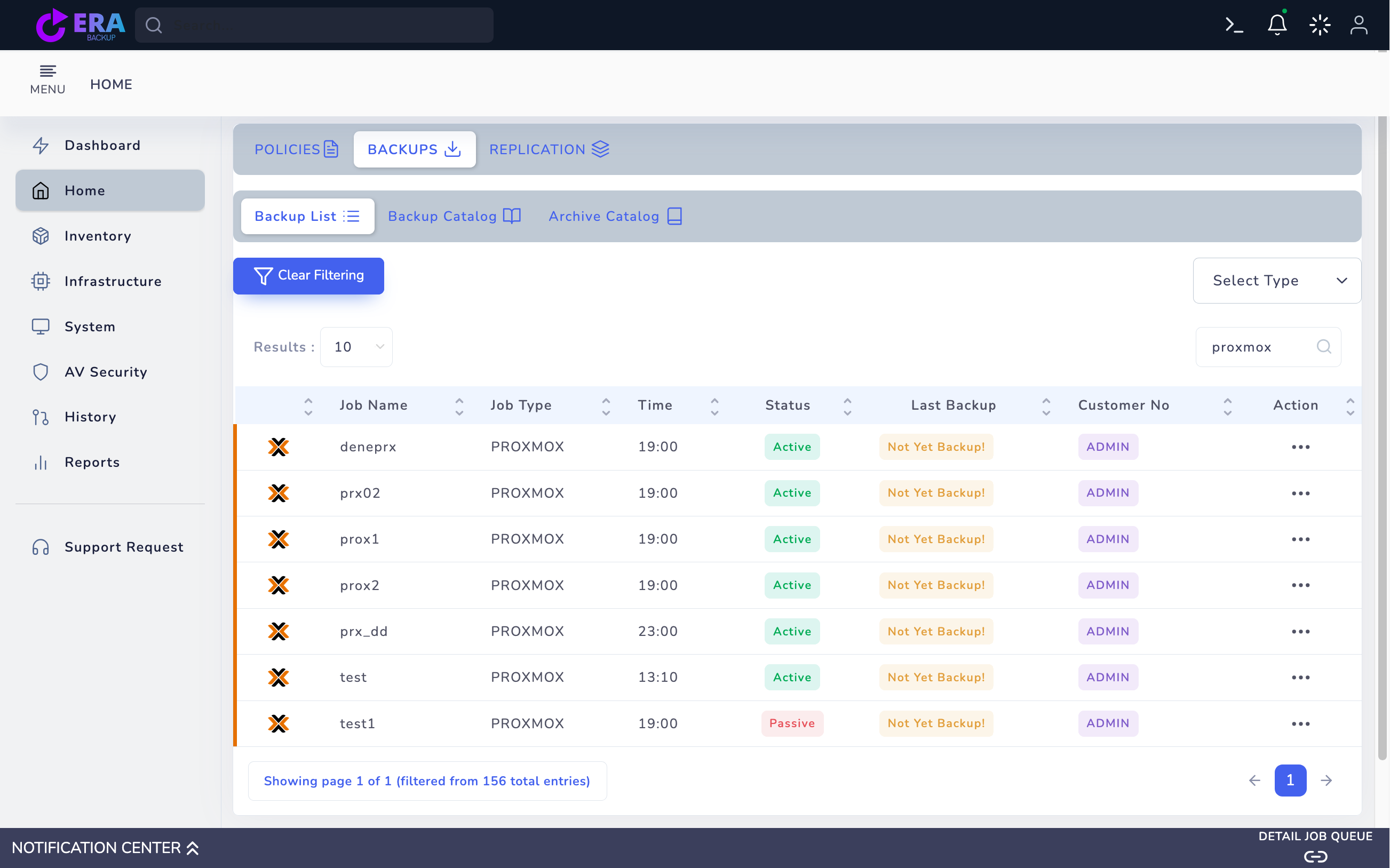
Find the Proxmox job in Home → Backups → Backup List. Compare VM identity, host/node, disk and Last Backup time. Not Yet Backup is not a usable point. Active job status does not prove a completed backup.
All existing jobs in the Proxmox catalog search show Not Yet Backup. With no usable point, the Original Location target was not live-validated and no restore was submitted. Enlarge ↗
Expected result
The correct platform and source record are selected.
02
2. Select a usable point in RESTORE
Open Step One through Action → Restore. Inspect the VM/item and Full/dependent points where available. All required disk components and the backup chain must be accessible in the repository. Do not initiate target writes from missing or invalid catalog records.
Expected result
The point and disk chain are accessible.
03
3. Assess the Original Location limitation
The inspected Proxmox template offers only Original Location; an alternative host/storage or safe copy target with a new VM name is not established by this form. Do not test against production records. Do not submit final Restore until source-identity and data effects are clear for the backend release.
Expected result
Target behavior and collision risk are explicit.
04
4. Prepare isolated lab and backend acceptance
In a controlled Proxmox lab document source VMID/name, disks/storage and effects on existing data with the technical team. The commented-out restore-name field is not an active feature. Do not assume snapshot, overwrite, new-VM creation or automatic startup behavior without actual release testing.
Expected result
Target and data effects are documented before execution.
05
5. Review Summary and the final action
Review source point, method, VM/disks and target summary. With only Original Location, do not proceed without validating effects on existing data and the isolated lab plan. A general technical discussion does not authorize overwriting a live VM. A preview screen is not evidence of successful recovery.
Expected result
The approved target and scope are recorded.
06
6. Compare task and hypervisor state
Compare EraBackup task results with VM and disk state on Proxmox. Avoid repeatedly restoring to the same target after errors or partial disk output. Check power/network state and keep the target separate from production traffic.
Expected result
Task, disk and VM state agree.
07
7. Document guest and application acceptance
In an isolated test validate boot, filesystems, all required disks, a test file/hash and critical application queries. Record backup ID, releases, target, duration and result. One VM acceptance does not establish cluster failover, instant recovery or cross-platform conversion.
Expected result
Usable data and guest results are documented.
COMMON QUESTIONS
Does this guide cover instant recovery or cross-hypervisor conversion?
No. These require separate source/target and release acceptance and are not established here.