Archive, backup retention, replication and WORM are different scopes. A visible policy field does not establish an operational archive data path, tape or cold-tier support across every platform. Validate installed-release and target support with support.
Screenshots were captured from the actual lab interface on 16 October 2026. The interface is in English; explanations follow your selected language. Resource names, dates and settings are examples; use values for your own environment.
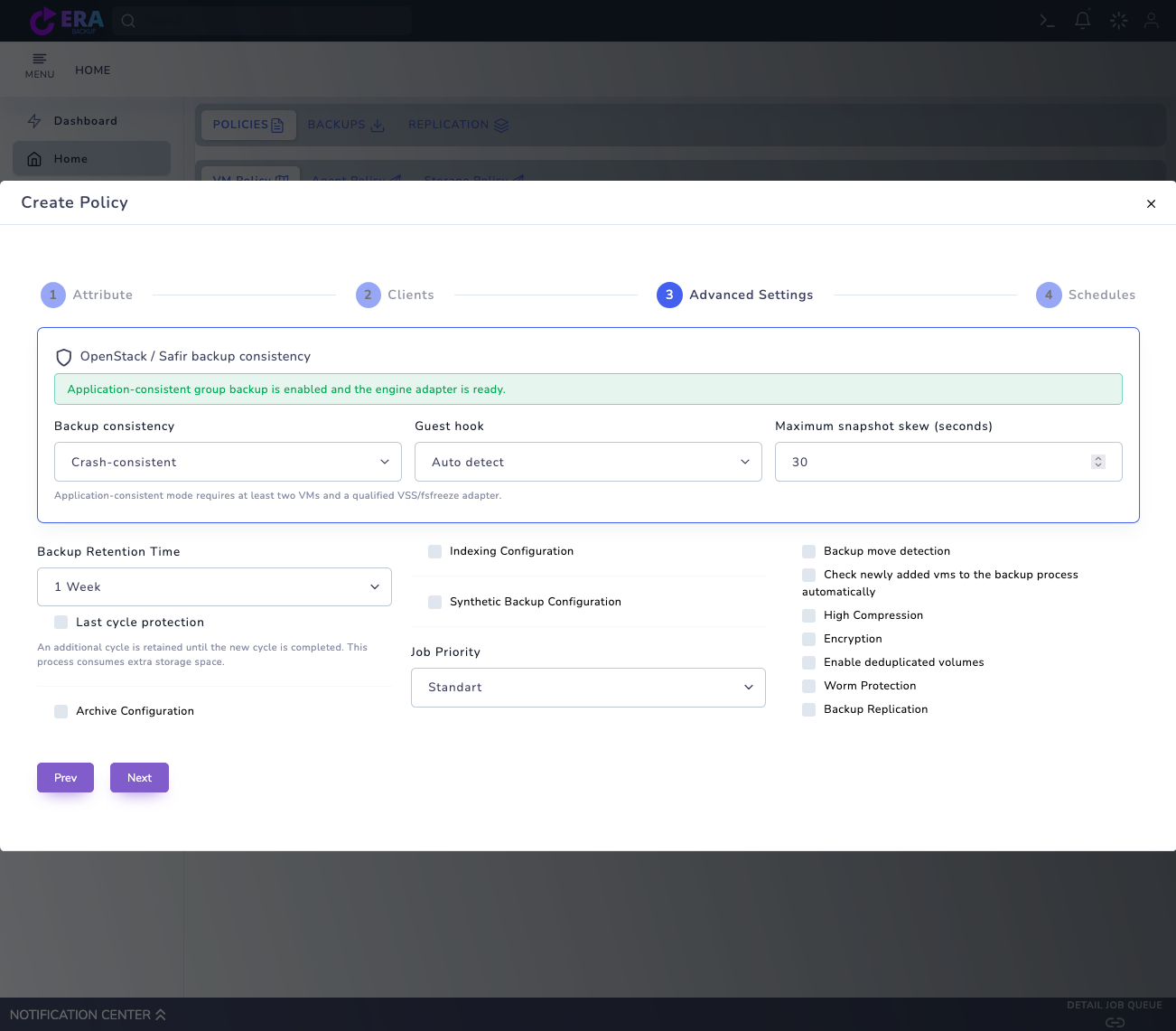
Visual note: the earlier real Advanced Settings draft is reused; Archive Configuration is unchecked. It does not show an expanded Archive Storage selection or a new archive job. This work changed no policy, retention or data and ran no archival, deletion or restore.
Data owner, business need and approved retention plan
Product release, method and target support
Capacity, access and recovery dependencies
Isolated restore and periodic acceptance plan
01
1. Approve the retention objective
Agree retention purpose, scope, period and periodic reviews with the data owner. Do not copy a period from a generic example; approve it against organizational requirements. This guide does not guarantee regulatory compliance or mandatory retention periods.
Expected result
Scope, responsible owner and acceptance results are documented.
02
2. Separate retention fields
Backup Retention Time, Archive Retention Time and any replication period may apply to different data paths. Verify which data and engine enforce the selected period. Selecting a long period does not guarantee immutability or an independent copy.
Earlier real Advanced Settings draft: Archive Configuration is unchecked and Backup Retention Time is visible. No archive target was selected; this is not proof of operational archiving, long-term acceptance or WORM. Enlarge ↗
Expected result
Scope, responsible owner and acceptance results are documented.
03
3. Preserve chain and catalog dependencies
Assess Full bases, required incrementals, manifests/catalog and access dependencies together. One recent point does not establish recovery of older data. Never manually delete chain pieces or reuse repository identities for another data area.
Expected result
Scope, responsible owner and acceptance results are documented.
04
4. Verify lifecycle behavior
Expiry does not imply simultaneous automatic deletion across engines. The inspected OpenStack/Safir retention guide skips Archive and WORM policies; do not generalize this behavior to every engine. Validate cleanup/GC, protection and shared-data relationships with support for the release.
Expected result
Scope, responsible owner and acceptance results are documented.
05
5. Plan access and release continuity
Plan continued access to accounts, certificates, keys, licenses and restore tools with responsible owners. Do not assume old backups restore on a new release without testing. Never put key or access files into public inventories or support messages.
Expected result
Scope, responsible owner and acceptance results are documented.
06
6. Test older recovery points periodically
Test representative older and newer points on an isolated target at organization-defined intervals. Record data/hash and application acceptance, retrieval time and required tools. Success of the latest backup alone is not long-term acceptance.
Expected result
Scope, responsible owner and acceptance results are documented.
07
7. Document period changes and exit planning
Assess data-owner decisions and recovery impact before shortening periods, changing targets or retirement. Do not attempt deletion by bypassing protection conditions. Contact destek@menabyte.com.tr with a redacted requirements summary for release-specific retention and transition planning.
Expected result
Scope, responsible owner and acceptance results are documented.
COMMON QUESTIONS
Is a long retention period WORM protection?
No. Retention policy, backend protection and recovery acceptance require separate validation; selecting a period alone does not establish immutability.