Scheduling, methods, retention chains and physical deletion/immutability are separate concerns. A generic VM screen does not establish identical behavior for Storage Policy or database engines; validate the installed scheduler/backend separately.
Screenshots were captured from the actual lab interface on 16 October 2026. The interface is in English; explanations follow your selected language. Resource names, dates and settings are examples; use values for your own environment.
Visual/action limit: real VM Policy Advanced Settings/Schedules screens from the earlier authorized inspection are reused unchanged. Displayed days/times/durations are lab examples, not evidence of every platform’s runtime behavior. No policy, Start Now, schedule/retention changes or cleanup/GC/deletion were performed.
Platform/method and policy identity
Calendar, time zone and Full/incremental chain
Repository reservations and retention capacity
Isolated restore and measured acceptance point
01
1. Define protection objectives and the run window
Record platform, source size/change rate, application dependencies and the last accepted point. Separate RPO objectives from measured transfer/backup duration; daily Full or frequent incremental examples do not suit every environment. Scheduler intervals do not establish zero loss or fixed RTO.
Expected result
Policy scope and the relevant acceptance result are recorded.
02
2. Validate source, method and policy activation
Do not accept Schedules before source/Clients, repository, method and consistency are validated. Full/incremental choices must match the engine/release; a database log job and VM incremental are different data paths. An Active policy is not a running or successful task.
Expected result
Policy scope and the relevant acceptance result are recorded.
03
3. Select Days, Months and Repeat scope
In the wizard inspect Schedules → Days and Months, then Repeat. The inspected VM screen offers Every week, Every two weeks and First/Second/Last week. Validate installed scheduler calendar/time-zone interpretation; visible choices do not establish missed-run/catch-up or daylight-saving behavior.
Expected result
Policy scope and the relevant acceptance result are recorded.
04
4. Inspect Full and Incremental timing separately
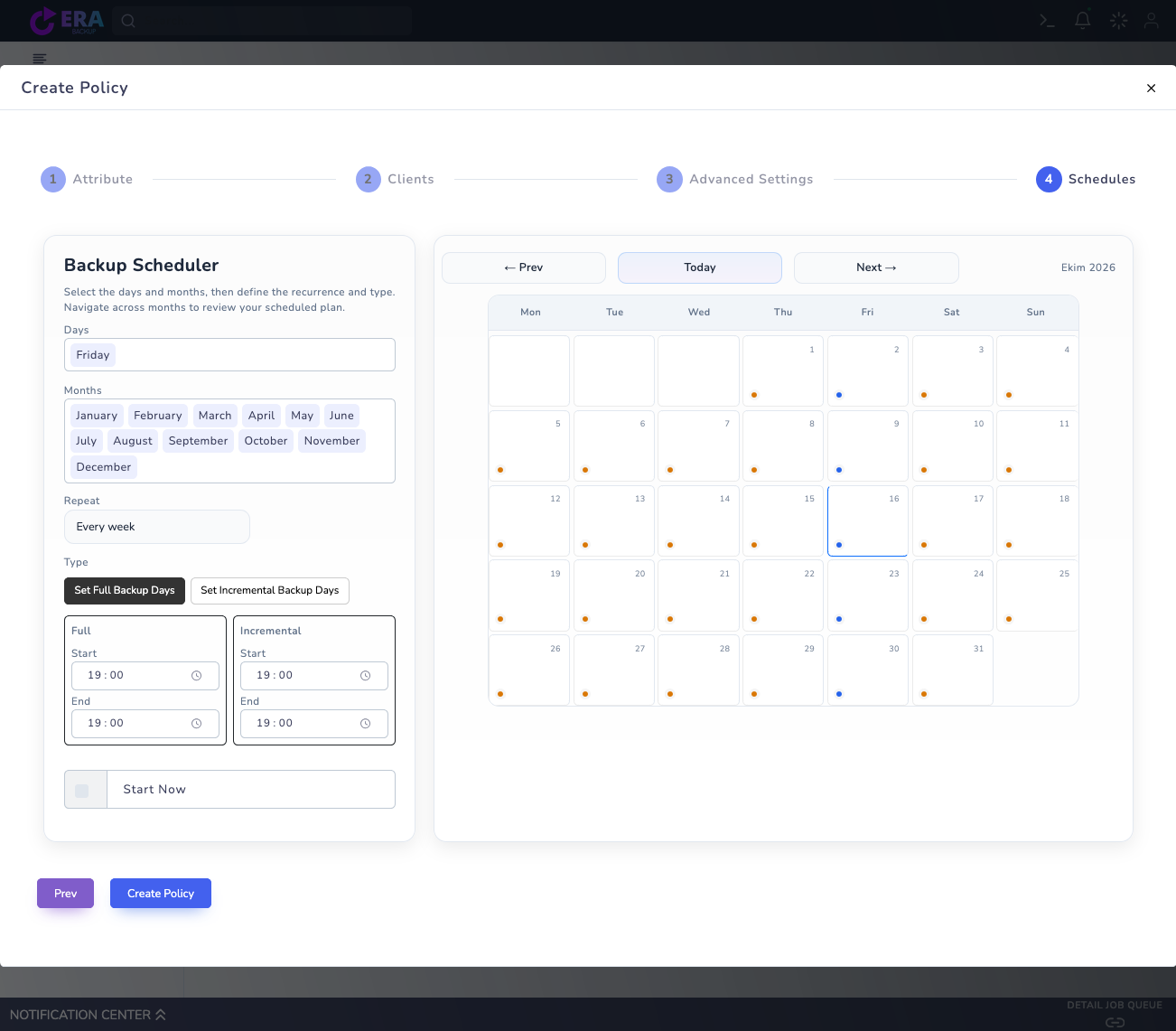
Compare separate days/times for Set Full Backup Days and Set Incremental Backup Days in the summary/calendar. Verify required Full bases and log/chain prerequisites for incrementals. Avoid overlaps for the same source. Start Now is a separate start request; do not select it merely to review the calendar.
Earlier real Schedules screen: Days, Months, Repeat and Full/Incremental windows. Start Now was not selected and Create Policy was not submitted. Times belong to this lab draft. Enlarge ↗
Expected result
Policy scope and the relevant acceptance result are recorded.
05
5. Match scheduler type and concurrency
Storage Policy engine documentation has a different daily/weekly/monthly contract: weekly runs on the creation weekday and monthly on the creation day of month. This is not the same as VM Repeat. Validate the relevant scheduler service, Transfer Limits, repository reservations and queue overlaps in the installed release.
Expected result
Policy scope and the relevant acceptance result are recorded.
06
6. Validate summary and effects before saving
Review policy name/ID, sources, method, Full/incremental days/times, repository and retention together. Editing an existing policy may affect future runs; record the previous schedule and change window. This inspection used no Create Policy/Start Now and changed no active schedule.
Expected result
Policy scope and the relevant acceptance result are recorded.
07
7. Compare planned and actual execution
In an approved pilot measure planned start, queue wait, actual start/end and the last usable point. Define monitoring criteria for missed windows or growing backlog. Accept Full/incremental chains with isolated restore; a calendar entry is not data-protection evidence.
Expected result
Policy scope and the relevant acceptance result are recorded.
COMMON QUESTIONS
Does a schedule or retention field guarantee data protection?
No. Validate actual execution, chain access, capacity and isolated data recovery separately. Retention duration does not guarantee WORM or immutability.