The main workflow covers KubeVirt VMs and persistent disks. Application-consistent database profiles use a different logical streaming workflow for PostgreSQL/MySQL. This is not a claim of complete cluster control plane/etcd recovery or out-of-the-box support for every CSI version.
Screenshots were captured from the actual lab interface on 16 October 2026. The interface is in English; explanations follow your selected language. Resource names, dates and settings are examples; use values for your own environment.
Lab note: the registered OpenShift cluster was deleted, so the live Clients screen was omitted. API access, resource selection and end-to-end backup must be verified after the cluster is rebuilt.
OpenShift/KubeVirt and CSI versions
Kubeconfig, RBAC and API access
StorageClass, snapshot support and repository data path
One test workload and an isolated recovery target
01
1. Verify cluster access and permissions
Verify that Master can reach the intended cluster API. Kubeconfig CA trust and required namespace/Job/PVC permissions must be ready. Use your approved kubeconfig and namespace in the checks below. If the API is unreachable or returns a timeout/no route to host, resolve connectivity with the platform administrator before selecting inventory.
Command example
oc get --raw=/readyz
oc -n <NAMESPACE> get vm,pvc
oc -n <NAMESPACE> get jobs
Expected result
The API is ready and access to the intended cluster and namespace is verified.
02
2. Select the OpenShift connection in Attribute
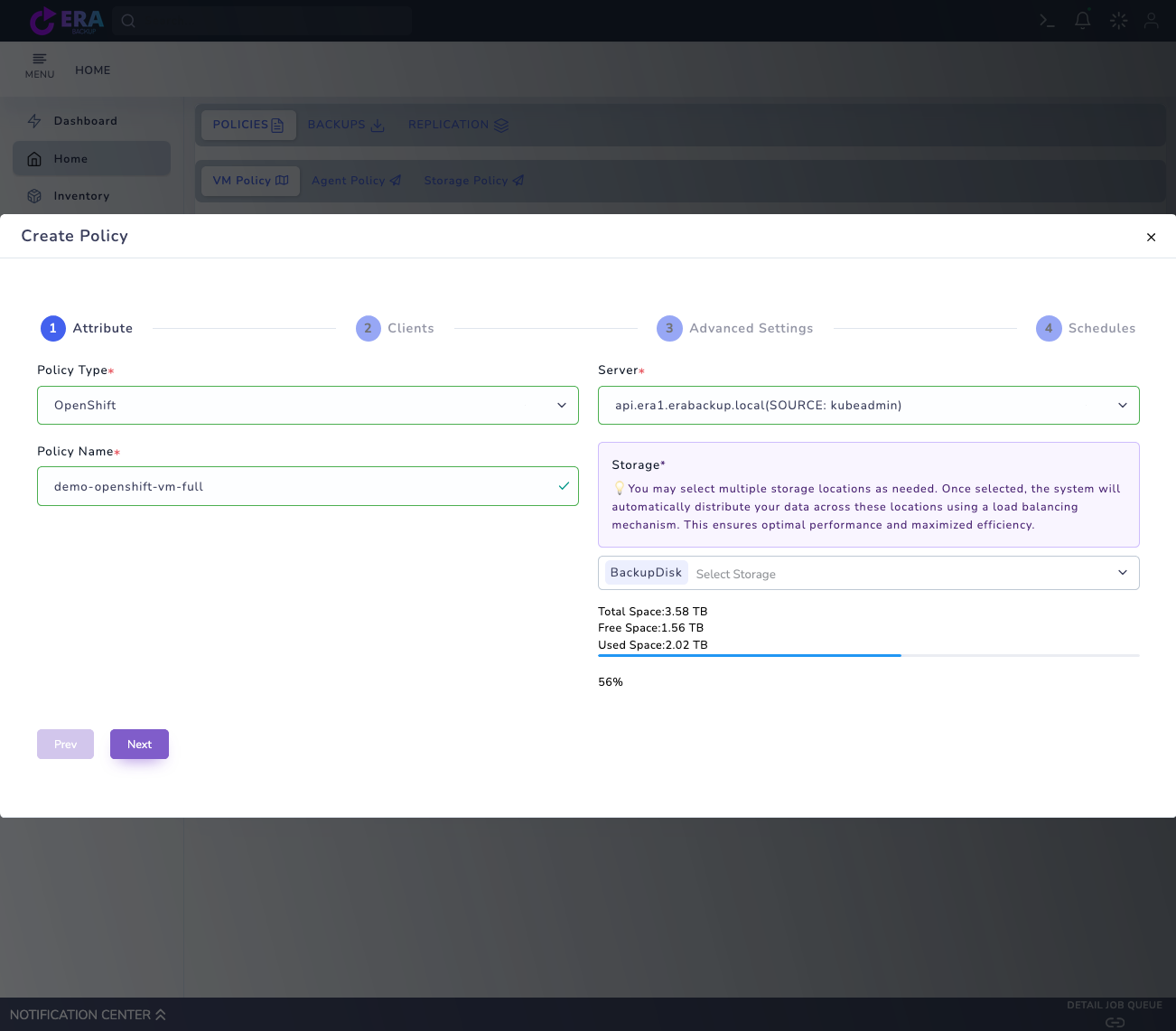
In Home → Policies → VM Policy → Create Policy, choose OpenShift as Policy Type. Select the correct cluster in Server, enter a test Policy Name and choose the validated repository in Storage. Compare API names and scope when multiple clusters are registered.
OpenShift Attribute: platform, registered API connection, policy name and Storage selection. Live Clients inventory is omitted because the cluster was deleted. Enlarge ↗
Expected result
The policy matches the intended cluster and repository record.
03
3. Select the VM and persistent disk scope in Clients
After inventory loads, select one KubeVirt test VM from the relevant namespace. Check disk/PVC dependencies and volume mode. Seeing a Pod name alone does not establish persistent-data coverage. If inventory is empty or the API fails, resolve Cluster/CSI/RBAC prerequisites before saving the job.
Expected result
The test VM and required PVC/disk scope are defined.
04
4. Separate VM consistency and database profiles
Set consistency and retention for the VM/PVC workflow in Advanced Settings. For PostgreSQL/MySQL logical backup, use Application-consistent database in a separate test: it requires one database Pod, engine, Service/Host, port, database, username, Credential Secret, Password Key and adapter image. Do not put password values in forms or screenshots.
Expected result
VM and database tests are planned with their distinct prerequisites.
05
5. Prepare the initial Full run
Define the initial full run day and time in Schedules and review policy scope. Select Start Now only during an approved test window. Validate VM incrementals against controller/CSI versions. Use Full for PostgreSQL/MySQL logical tests; a logical dump with PITR disabled is not the same as a VM incremental chain.
Expected result
The initial Full plan and selected workload type are clear.
06
6. Monitor the Kubernetes Job and repository transfer
Check the EraBackup task/notification together with OpenShift Job/Pod state. For Pending or ContainerCreating, inspect RBAC, image pull, CNI, nodes and repository connectivity. Do not print Secret values to logs. A successful result completes the task and creates a selectable backup record.
Operation results match Job/Pod state and catalog records.
07
7. Complete catalog checks and restore acceptance
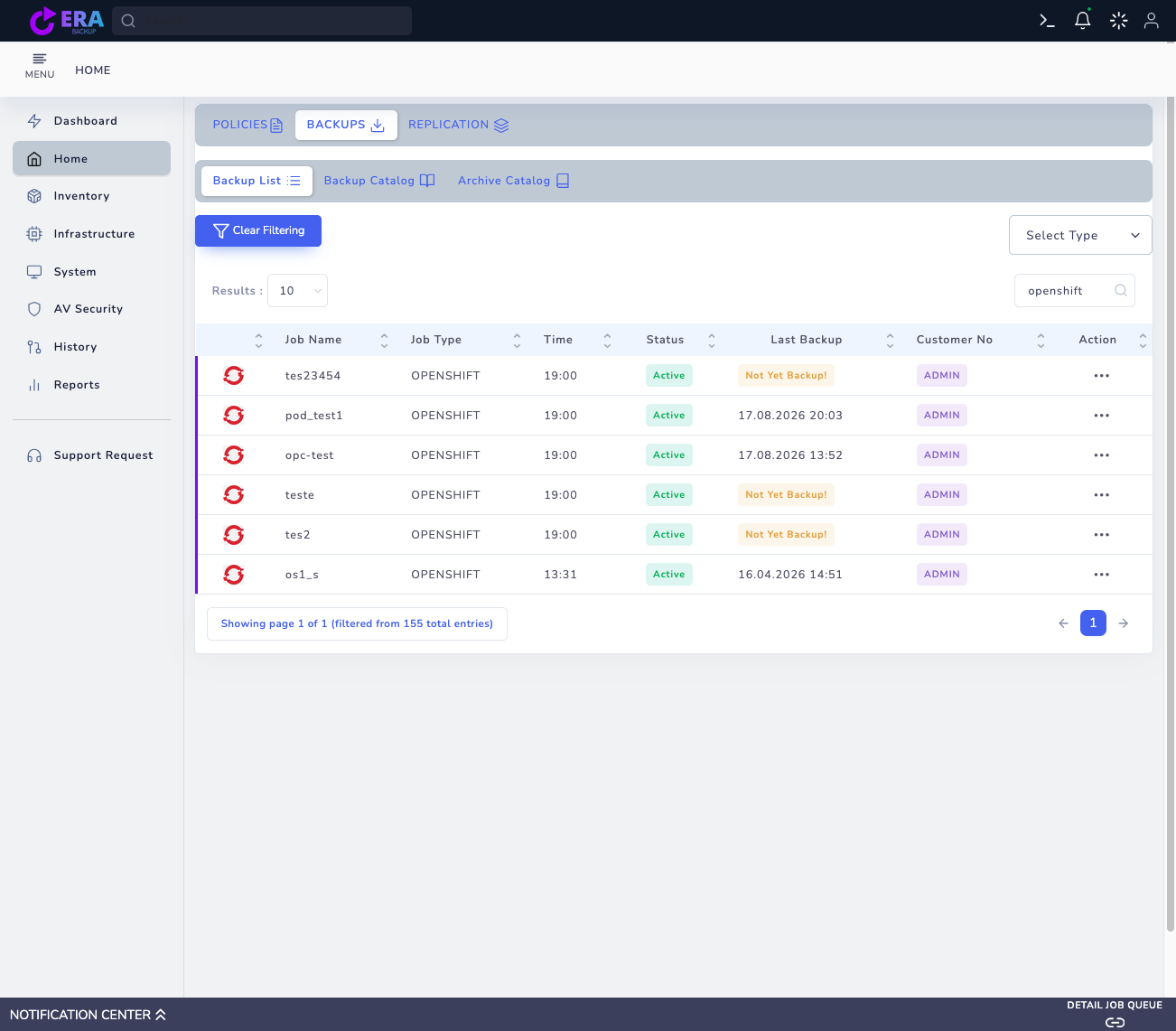
Find the OpenShift record in Backups and check source namespace, VM/workload name, backup type and time. Follow the OpenShift restore guide to validate data in a new VM/PVC target or empty target database. VM restore success does not establish complete cluster disaster recovery.
Existing OpenShift Backup List records. Last Backup is historical catalog information; it does not demonstrate current cluster access or a new successful backup. Enlarge ↗
Expected result
A recovery point and workload-specific restore acceptance record are available.
COMMON QUESTIONS
What if a cluster is listed but Clients does not load?
A registered connection name does not establish live API access. Check the API network, CA, kubeconfig and RBAC from Master. Do not consider resource selection or backup acceptance complete until access is restored.