The VMware repository/CBT workflow and the legacy VMDK/media-server workflow can use different delivered components. Confirm source, proxy/VDDK version and repository mode with the technical team. A visible UI option does not establish data-path readiness.
Screenshots were captured from the actual lab interface on 16 October 2026. The interface is in English; explanations follow your selected language. Resource names, dates and settings are examples; use values for your own environment.
Some lab screenshots are withheld pending privacy review. Follow the documented steps and use your own environment values.
vCenter/ESXi version, API account and required access
Matching Master, proxy/VDDK and repository versions
Datastore access, free capacity and a test VM
Acceptance plan for restore to an isolated target
01
1. Prepare vSphere and the data path
Validate the intended vCenter/ESXi connection and VM inventory. Check proxy access to source datastores and the repository. Assess snapshot create/remove permissions together with proxy and VDDK versions. Choose a small test VM and record a file to verify after recovery.
Expected result
Source, proxy and repository are validated in the same test plan.
02
2. Select the VMware source in Attribute
Open Home → Policies → VM Policy → Create Policy. Choose VMware in Policy Type and the correct vCenter connection in Server. Enter a distinctive test Policy Name and use a validated repository record in Storage. Check for similarly named vCenters or storage records.
Expected result
VMware, the correct source connection and storage target are selected.
03
3. Select one test VM in Clients
Filter Clients with search and select only the test VM. Check Machines Selected in Summary. Avoid Select All and automatic inclusion of new VMs for the initial test. For a multi-disk VM, verify the full required disk set; a single-disk result is not acceptance of the entire VM.
VMware Clients: selecting one test VM. This policy draft was not saved.
Expected result
Selected resource count matches the test scope.
04
4. Assess HotAdd and retention
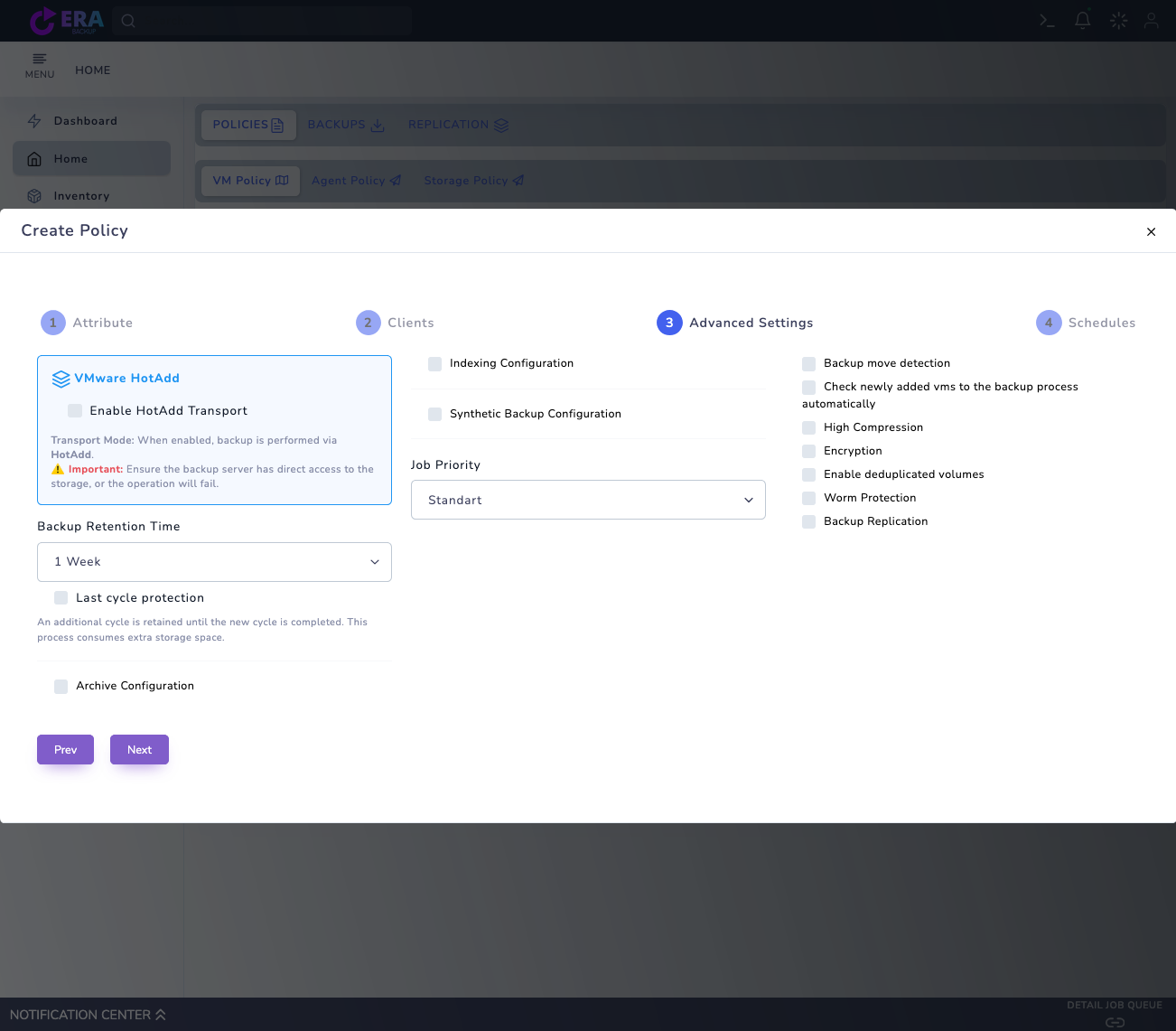
Set Backup Retention Time in Advanced Settings. Enable HotAdd Transport only after validating proxy/storage access and transport prerequisites for your deployment; it is off in the example. Use compression, encryption, WORM and other options only within the accepted scope of the delivered version.
VMware Advanced Settings: HotAdd is off and retention shows an example value. Validate the transport selection in your environment. Enlarge ↗
Expected result
Retention is defined and unvalidated transport options remain disabled.
05
5. Schedule the initial Full backup
Configure Set Full Backup Days, Days, Months and Repeat in Schedules. Review the Full start/end window and time zone. Use Start Now only during an approved test window. Recheck source, storage and retention before saving with Create Policy; do not accept an incremental run before a successful initial full point exists.
Expected result
The policy is saved with the correct source and a clear initial Full schedule.
06
6. Monitor snapshots, transfer and job results
Review source, job type, progress and final status in tasks/notifications. Ask the vSphere administrator to check for unexpected remaining snapshots or consolidation warnings. On failure, record proxy version, job ID and time; investigate the cause rather than repeatedly start the job.
Expected result
Successful final status and source snapshot health are checked together.
07
7. Verify the recovery point and CBT chain
Check that the correct source and full point appear in Backup List and RESTORE. On later incremental runs, monitor the CBT chain and availability of the required full point. Investigate any new-full requirement. Validate data and guest startup using the new, isolated target test in the VMware restore guide.
Expected result
A selectable recovery point and a record for isolated restore acceptance are available.
COMMON QUESTIONS
Should HotAdd be enabled in every VMware deployment?
No. Proxy, datastore and transport prerequisites depend on deployment. The presence of the option does not establish a validated HotAdd path in that environment.