Define your workload. Validate persistent data separately.
Prepare EraBackup Kubernetes agent policies, PVC/Pod selection and node/control-plane methods for your distribution; plan catalog and isolated restore acceptance together.
Kubernetes Backup exposes PVC, ETCD, KUBELET, ETCKUBERNETES and CLUSTER options. These labels do not establish whole-cluster recovery support across releases. The OpenShift VM/database workflow is separate and does not automatically apply to generic Kubernetes or Rancher.
Screenshots were captured from the actual lab interface on 16 October 2026. The interface is in English; explanations follow your selected language. Resource names, dates and settings are examples; use values for your own environment.
Lab note: the Kubernetes agent returned a read timeout. The existing test job shows Not Yet Backup; no usable point or restore target screen was captured. No policy was saved and no backup/restore was started.
Distribution/Kubernetes, agent and repository releases
Source cluster/node, namespace, Pod and PVC inventory
StorageClass/CSI, access and application consistency
Separate plan for manifests, Secrets and external dependencies
01
1. Define the application unit and RPO
Inventory Deployment/StatefulSet, Service, ConfigMap, PVC and external database dependencies. Keep Secret values out of output. Separate ephemeral Pod filesystems from PVC data; a Pod name or manifest list is not a complete application backup.
Expected result
Protected resources and the recovery objective are documented.
02
2. Verify source access and storage scope
Verify the correct kubeconfig context, namespace access and required agent connection. If CSI snapshots are used, separately check driver, snapshot controller and VolumeSnapshotClass compatibility; this does not imply every EraBackup method uses snapshots. A snapshot alone does not establish a repository copy.
Command example
kubectl config current-context
kubectl -n <NAMESPACE> get pods,pvc
kubectl get storageclass
Expected result
Access and prerequisites for the selected data path are understood.
03
3. Prepare the Kubernetes Backup policy
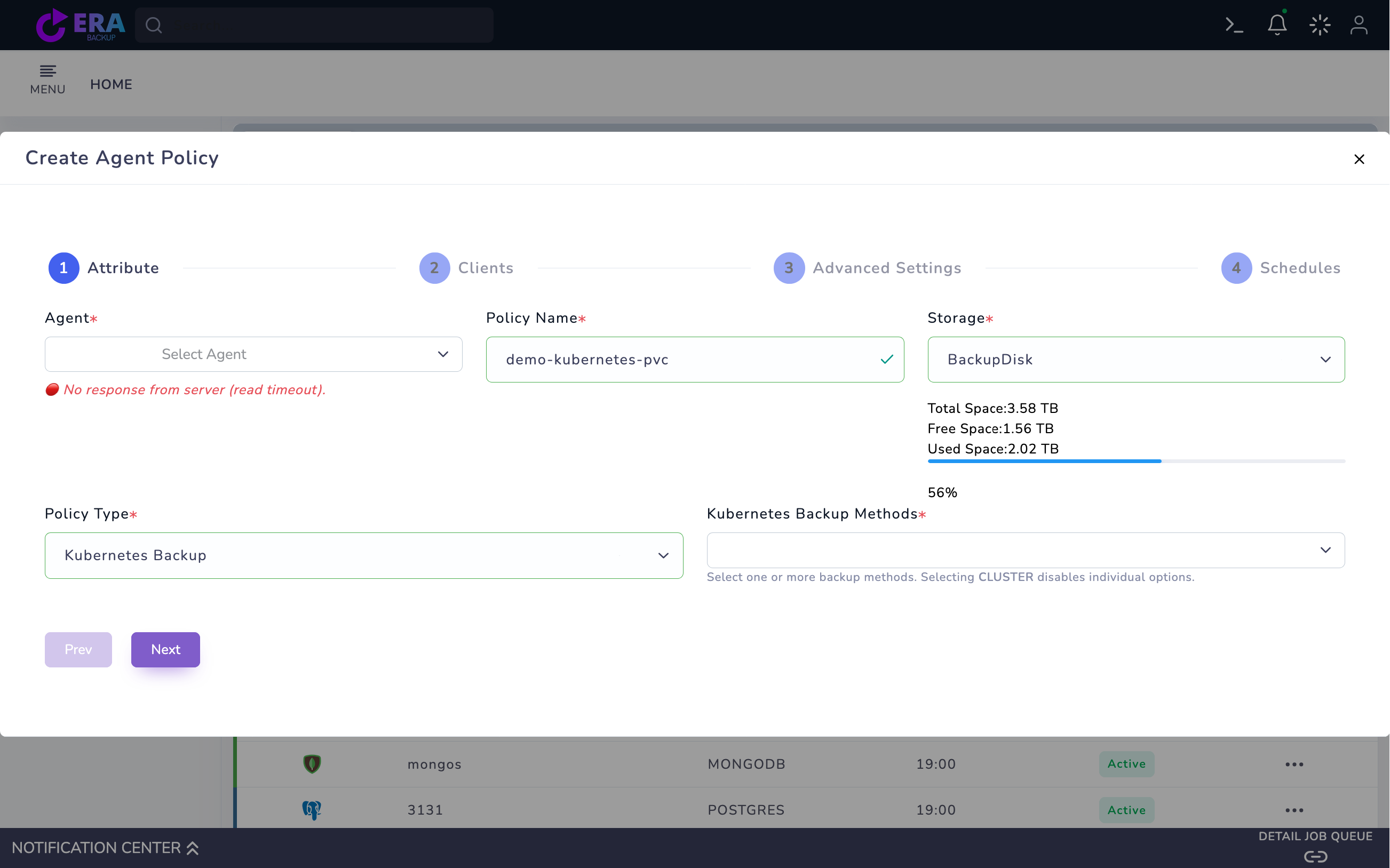
Open Home → Policies → Agent Policy → Create Agent Policy. Select the correct Linux Agent, Policy Name and Storage. Choose Kubernetes Backup as Policy Type. Treat an agent connection error as a form-only inspection; a registered node name is not live cluster access.
Kubernetes Backup and an empty Kubernetes Backup Methods field. The agent reports a read timeout; the example policy name does not prove PVC selection or source access. The draft was not saved. Enlarge ↗
Expected result
A source/repository draft is prepared.
04
4. Separate PVC and node/control-plane methods
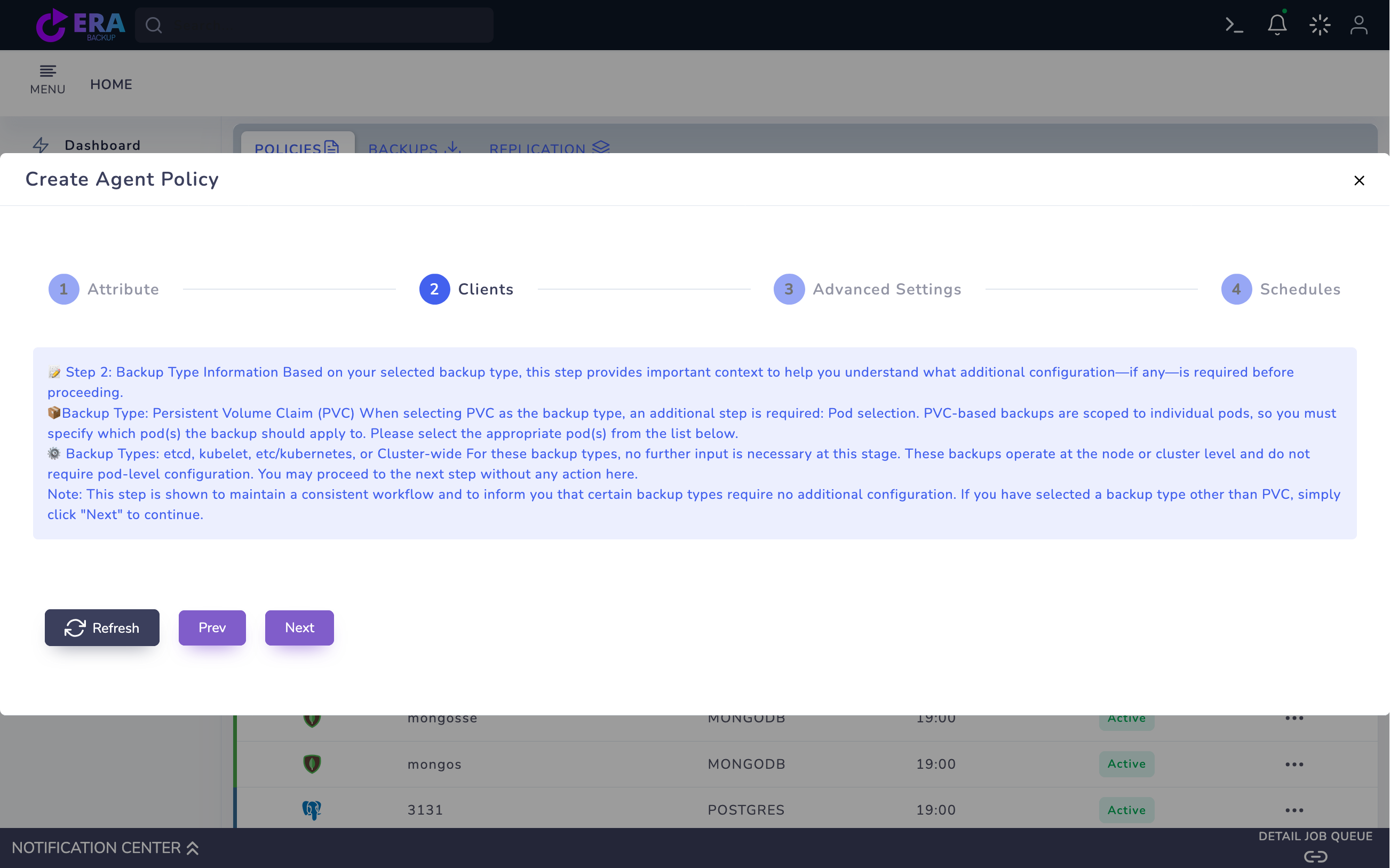
Evaluate the appropriate PVC method in Kubernetes Backup Methods for an initial workload test; it requires the relevant Pod selection in Clients. ETCD, KUBELET and ETCKUBERNETES address node/control-plane scope. CLUSTER may disable individual selections; this behavior is not a full disaster recovery guarantee. Select only the approved protection method.
Actual Clients information screen after ETCD selection. Its Pod/PVC and node-method explanations are not source inventory or data transfer. Enlarge ↗
Expected result
The method and required source selection are explicit.
05
5. Plan consistency and scheduling
For a PVC containing a database distinguish crash consistency from application consistency; validate the matching quiesce/native database plan. Set retention and scheduling against RPO and repository capacity. ETCD configuration may offer KUBECTL/RKE2; assess suitability for the installed distribution separately.
Expected result
Consistency and retention plans match the selected method.
06
6. Monitor Full results and catalog in an approved test
After validating source selection and access, review the summary and save the approved test policy. Use the appropriate Full action provided by the release. Compare task, repository object, method, namespace/Pod and time. A notification or Last Backup alone is not data acceptance.
Expected result
Output and catalog records match the source.
07
7. Complete isolated PVC and application acceptance
Validate a test file or critical application query on an isolated target. Record the recovery order for PVC data, manifests and external services. Document namespace, storage, versions, backup ID and duration. An application test does not establish etcd/control-plane recovery acceptance.
Expected result
Workload recovery acceptance is documented.
COMMON QUESTIONS
Does CLUSTER mean ready DR on every distribution?
No. A menu label does not replace distribution/release, data-path and actual isolated restore acceptance.