Inspect the Exchange recovery point. Complete mailbox acceptance with evidence.
Inspect the Exchange catalog item, recovery point and mailbox selection screen; distinguish a UI preview from an actually completed recovery operation.
The current source template includes Object Restore → Mailbox. Database Restore, Calendar, Contact and Task are disabled; the Restore Selected Items handler only shows a notification. This is a preparation and acceptance guide, not a working granular restore procedure or success guarantee for this release.
Screenshots were captured from the actual lab interface on 16 October 2026. The interface is in English; explanations follow your selected language. Resource names, dates and settings are examples; use values for your own environment.
Validation limit: no Exchange restore was submitted during this work. Mail content was not viewed; catalog/item screens are used where available. End-to-end mailbox or database recovery has not been validated.
Matching Exchange instance/database and catalog time
Accessible backup object and required mount/index components
Approved test mailbox and target acceptance plan
Actual backend operation record and target content validation
01
1. Separate database and mailbox objectives
Full database recovery and mailbox item recovery are different operations. Identify the required target and matching agent/master release. DAG rejoin, Recovery Database or recovery to Microsoft 365 cannot be inferred from this screen; each requires a separately validated procedure.
Expected result
Recovery type and release scope are explicit.
02
2. Find the Exchange catalog record
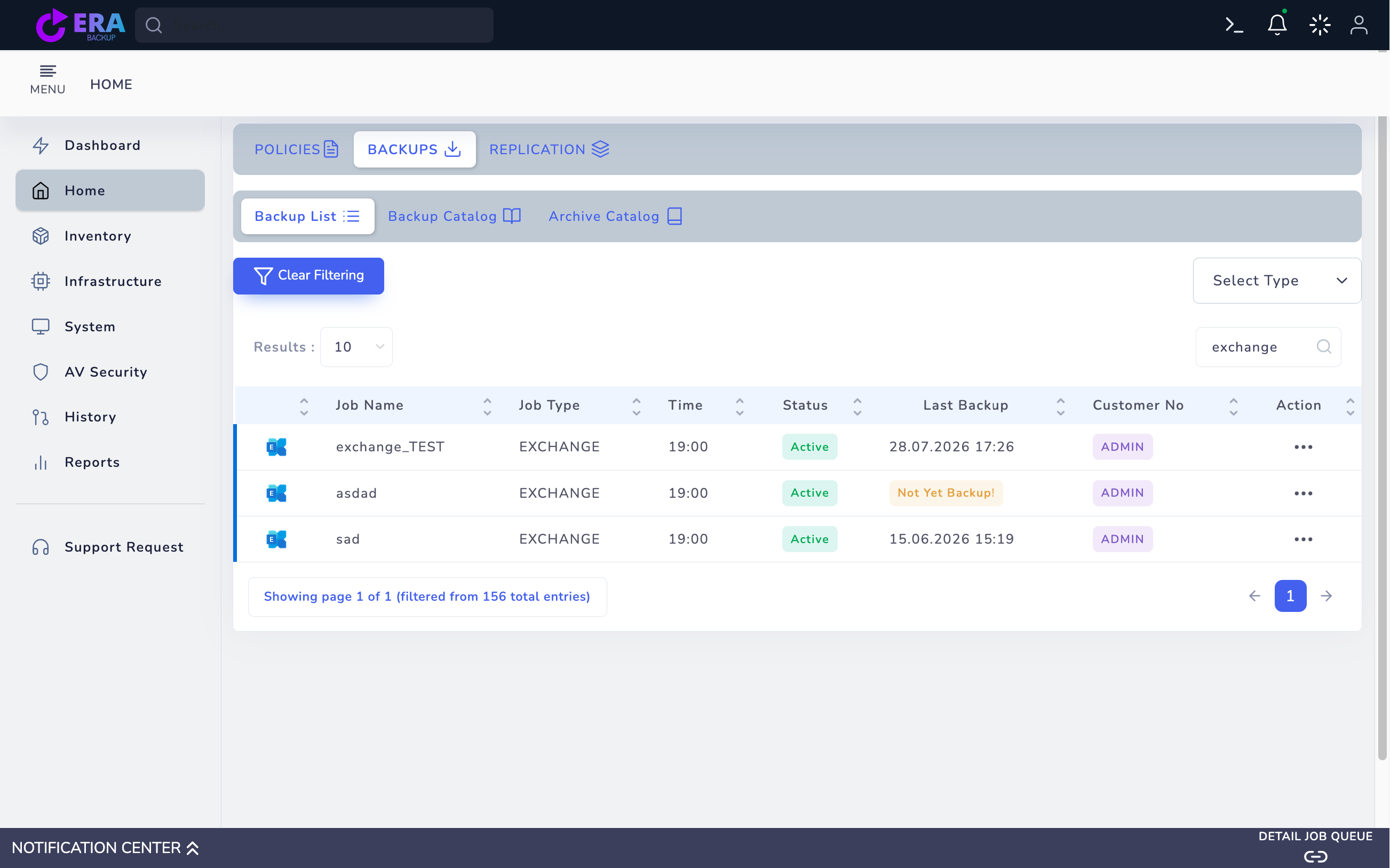
Filter by Exchange type or job name in Home → Backups → Backup List. Compare instance/database and Last Backup time with the recovery request. Do not treat Not Yet Backup jobs or inaccessible objects as usable points. Historical catalog records do not prove live agent connectivity.
Exchange job type, test records and Last Backup fields. This catalog image is not end-to-end data recovery acceptance. Enlarge ↗
Expected result
The record for the requested database and time is identified.
03
3. Open the item in RESTORE Step One
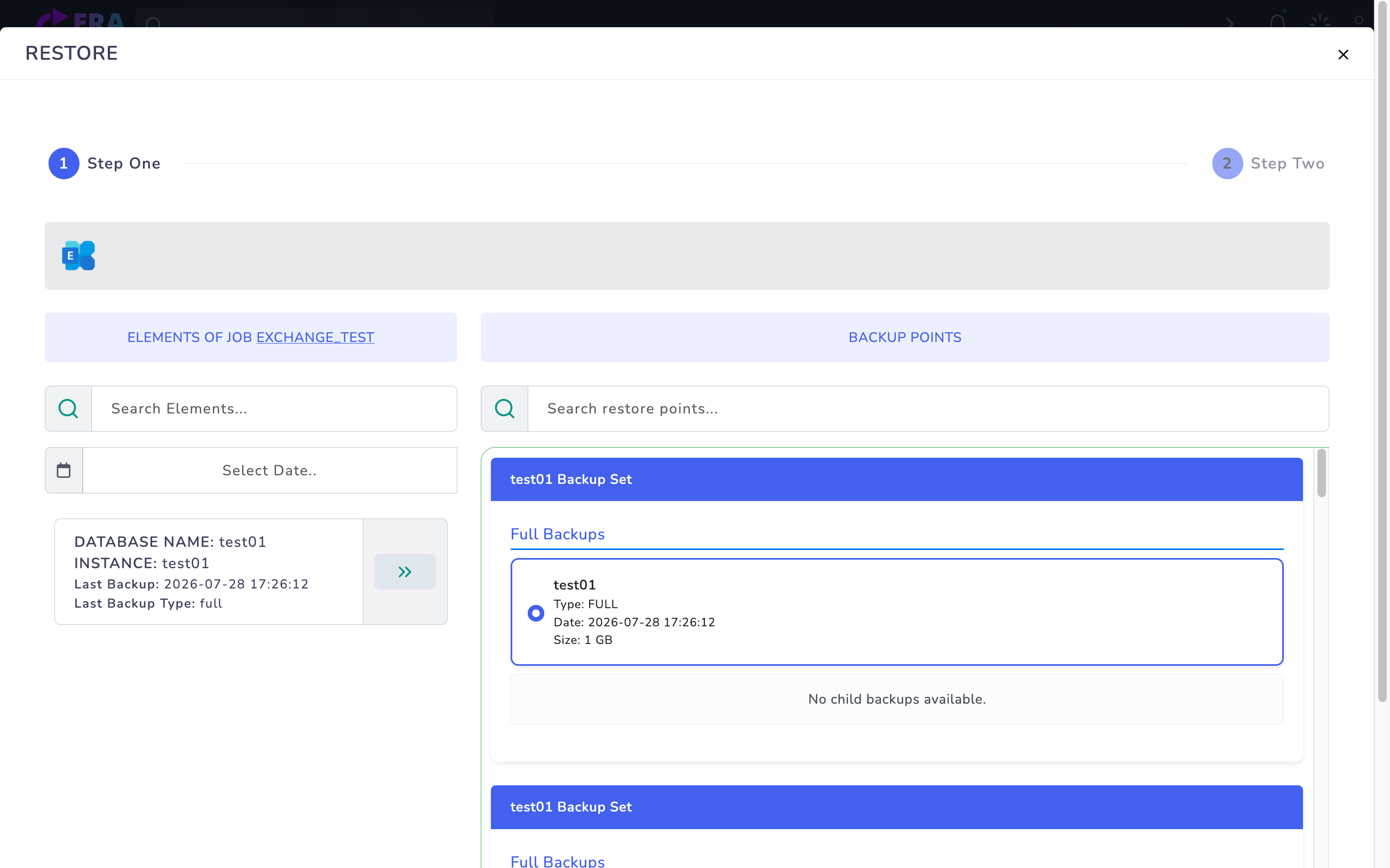
Open Action → Restore. Select the database/instance item under ELEMENTS OF JOB and inspect BACKUP POINTS. If items or points do not load, check catalog and repository access rather than choosing arbitrary dates. Select a usable point and use Next only to inspect the preview.
RESTORE → Step One: Full points for the test01 database/instance. Next returned Operation failed, so a mailbox preview screenshot is omitted; restore was not submitted. Enlarge ↗
Expected result
An accessible item and point are selected for preview.
04
4. Inspect mailbox preview scope
For a usable record Step Two may show Object Restore and Mailbox. Selecting a mailbox user requests the existing index/mail list. Viewing this screen or list does not mean content was written to a destination. Do not interpret disabled Database Restore, Calendar, Contact and Task options as supported operations.
Expected result
Active preview and disabled options are distinguished.
05
5. Review mail content and target deliberately
Inspect only authorized test mailbox content. Compare subject, time and selected-item count with Summary; keep production personal correspondence out of screenshots. The current template does not establish target routing or duplicate handling; validate target and permissions explicitly in a working release.
Expected result
Authorized item scope and target validation requirements are documented.
06
6. Do not treat a notification as a restore result
In the inspected source Restore Selected Items only displays Restore Started; its handler contains no request that starts a server-side task. Do not treat pressing this button as completed recovery in this release. First validate the backend operation, task ID, error/result record and data destination in a matching release.
Expected result
Preview notifications are separated from actual recovery evidence.
07
7. Document test mailbox acceptance
When a working backend workflow is available, compare content, attachments, timestamps and item counts at the approved test target. Also record duplicate behavior, permissions and task results. Run database/DAG acceptance separately from mailbox tests. Do not claim end-to-end Exchange restore validation without this evidence.
Expected result
Recovery acceptance completes only with actual target data.
COMMON QUESTIONS
Is Restore Started evidence of success?
No. In the inspected template it is only a UI notification. An actual backend operation record and validated target content are required.