This guide covers the Linux SQL → DB2 agent workflow. Database and db2_tablespace destinations are assessed separately. A TABLE SPACE option or Table Name label does not guarantee granular single-table recovery. Validate online/offline, logs/rollforward, HADR, pureScale/DPF and encryption scope separately for the installed release.
Screenshots were captured from the actual lab interface on 16 October 2026. The interface is in English; explanations follow your selected language. Resource names, dates and settings are examples; use values for your own environment.
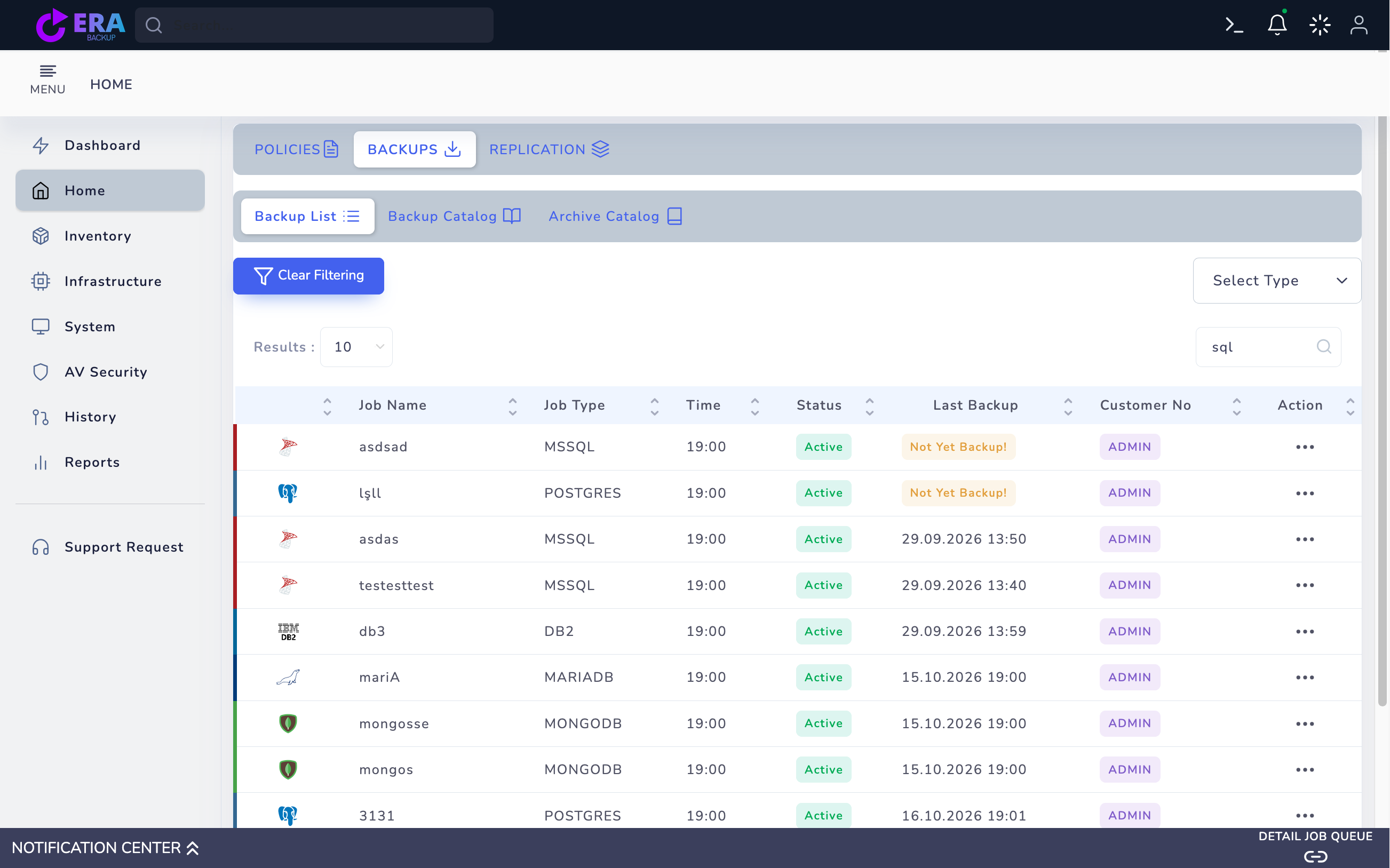
Real-screen limit: the Backup List image from the earlier authorized lab inspection is reused unchanged; it shows db3 / DB2 and a historical Last Backup date. This entry does not prove current agent access, image integrity or successful restore. No new DB2 policy/Clients/target screen was captured; no backup, restore, rollforward or activation was executed.
Engine, agent/master releases and instance identity
Database scope, method and access privileges
Full base, log chain and repository access
Isolated destination, collisions and application acceptance
01
1. Identify the DB2 instance and database
With the DBA, record DB2 release/fix pack, Linux and agent/master releases, instance owner, database name/alias and storage layout. Define a small test database and acceptance queries. Do not equate HADR, pureScale or DPF topology with standalone acceptance.
Expected result
DB2 scope and relevant acceptance evidence are recorded.
02
2. Verify agent and DB2 environment access
Validate access from the Linux agent service to the correct DB2 instance environment and required native tools. Check instance owner, profile/environment, required DB/OS privileges, data/log paths and repository capacity with the DBA. Keep credentials and encryption keys out of screenshots/logs; a running service does not establish database access.
Expected result
DB2 scope and relevant acceptance evidence are recorded.
03
3. Prepare a SQL → DB2 policy draft
Open Home → Policies → Agent Policy → Create Agent Policy. Select the correct Agent, a unique Policy Name and Storage; use DB2 under SQL. Do not substitute MySQL, Oracle, File Backup or Bare Metal for DB2 database protection. If a registered instance cannot be found, validate access and release compatibility.
Expected result
DB2 scope and relevant acceptance evidence are recorded.
04
4. Match database and TABLE SPACE scope
Open the correct instance and test database elements in Clients and compare selection with the summary. The inspected DB2 Backup Methods panel includes TABLE SPACE. Validate the actual backup method and tablespace set against the installed backend; checking a box does not establish single-table recovery or consistent acceptance of every tablespace.
Expected result
DB2 scope and relevant acceptance evidence are recorded.
05
5. Plan online/offline and log requirements
With the DBA, define online/offline method, archive-log configuration, required Full base and any incremental/log chain. For acceptance requiring rollforward, plan retention and access for every required log. Do not infer automatic log replay, PITR or HADR integration from a UI method; record special-storage/encryption dependencies separately.
Expected result
DB2 scope and relevant acceptance evidence are recorded.
06
6. Plan scheduling and initial backup acceptance
Check scheduling and retention actually exposed for the engine/method in Advanced Settings and Schedules. Compare Full-base and dependent log/differential/incremental-chain retention with capacity; do not assume every method applies to each engine. In an approved small test, record task result, repository output and catalog method together.
Expected result
The selection and relevant acceptance evidence are recorded.
07
7. Complete catalog and isolated data acceptance
In an approved small test, jointly validate task result, repository backup image, method and DB2 catalog identity. The historical db3/DB2 Backup List entry is not a new test result. Use the separate DB2 restore guide to accept database/tablespaces, log state and application queries on an isolated target.
Earlier real Backup List image: db3 / DB2, Active and a 29 September 2026 Last Backup entry. Other engines appear in the same list. This is historical catalog evidence only, not a new DB2 backup/restore or current connection acceptance. Enlarge ↗
Expected result
DB2 scope and relevant acceptance evidence are recorded.
COMMON QUESTIONS
Does a successful task mean the application is ready?
Not by itself. Engine integrity, required log chains, data queries and application access need separate validation; HA/topology acceptance is assessed separately.