This page is a preparation and acceptance guide for the Exchange Backup policy screen. A visible option does not establish end-to-end database/DAG or granular mailbox recovery readiness. This workflow does not establish Microsoft 365/Exchange Online support.
Screenshots were captured from the actual lab interface on 16 October 2026. The interface is in English; explanations follow your selected language. Resource names, dates and settings are examples; use values for your own environment.
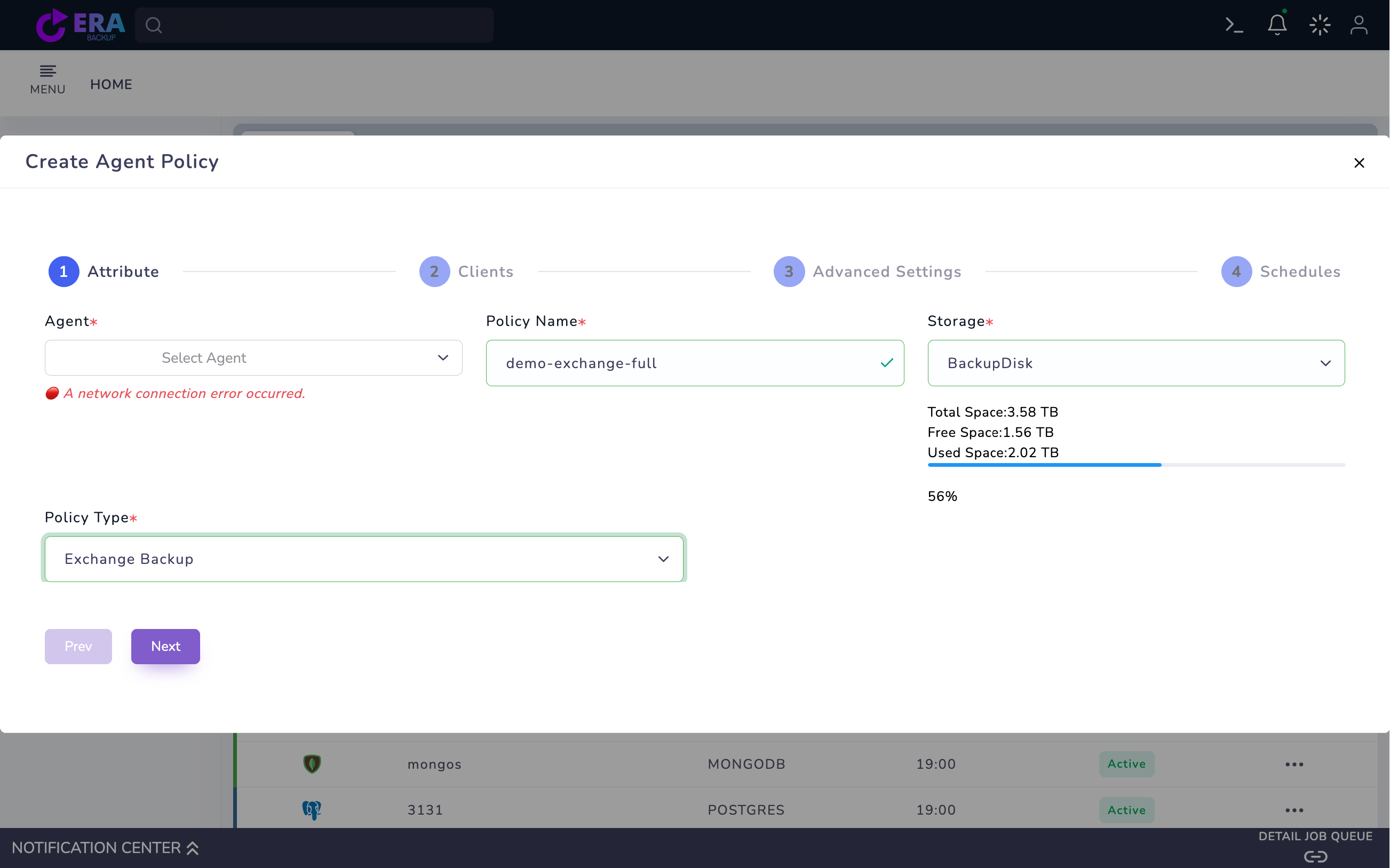
Lab note: the Exchange agent reported a connection error; no policy was saved and no backup was started. Screenshots cover the draft and existing catalog.
Exchange and Windows Server version, CU and agent version
Standalone/DAG topology and database placement
DNS/FQDN, required service account and access
Separate database and mailbox acceptance targets
01
1. Define the protection unit
State the objective as database backup, a DAG scenario or mailbox item recovery. Inventory servers, databases and the test mailbox. These objectives have different privileges and recovery paths; one successful task does not validate them all.
Expected result
The protection unit and test scope are explicit.
02
2. Verify the Windows agent and connection
Match the agent release to Exchange/Windows versions. Check DNS/FQDN, service account and required access. For DAG define the source node/database copy and failover behavior in a release-specific test plan. Resolve connection errors before running a policy.
Expected result
Source access and agent compatibility are verified.
03
3. Prepare the Exchange Backup policy
Open Home → Policies → Agent Policy → Create Agent Policy. Select the Exchange server Agent, a unique Policy Name and Storage. Set Policy Type to Exchange Backup. If a network connection error appears, treat the screen only as a draft; a registered server is not necessarily online.
Exchange Backup draft: Agent, Policy Name and Storage. Resolve the displayed network connection error before treating the source as accessible. The policy was not saved. Enlarge ↗
Expected result
An unsaved Exchange policy draft is prepared.
04
4. Inspect the instance and database list
Open the database list from the registered instance card in Clients. Add Instance contains instance name, username, password and Exchange Cluster FQDN; manage values only in the authorized connection record. Select one database for the first test. If the list does not load, resolve source connectivity and permissions before continuing.
Expected result
Database selection matches the actual source list.
05
5. Agree consistency, retention and scheduling
Review Advanced Settings and Schedules against the installed agent scope. Separately validate Exchange-aware consistency, log handling and DAG copy behavior with the technical team; a generic VSS option does not establish all these capabilities. Avoid an unplanned Start Now for the initial test.
Expected result
Consistency and retention behavior are defined in the acceptance plan.
06
6. Monitor the task and catalog in an approved test
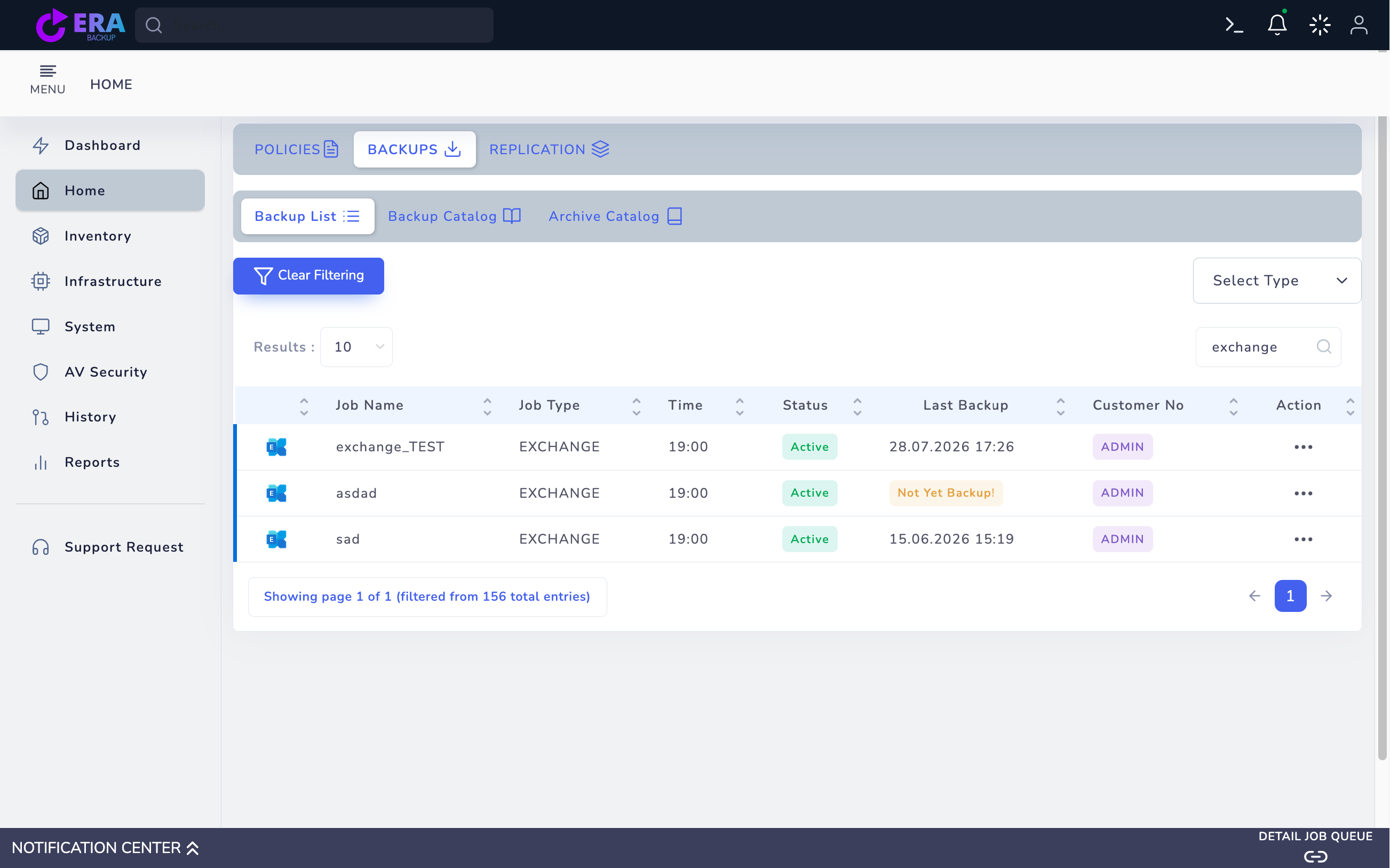
After validating source connectivity and release scope, save the approved test policy and use the appropriate Full action. Compare task record, notification, instance/database name, time and repository object. Last Backup is historical catalog information, not mailbox restore acceptance.
Existing test records in Exchange Backup List. A historical Last Backup time does not demonstrate live agent access or successful mailbox restore. Enlarge ↗
Expected result
Backup output and task records match the source.
07
7. Complete restore acceptance separately
Plan separate database and mailbox recovery acceptance. In the inspected web template the final mailbox action only produces a success notification; it does not prove a working server-side restore. Do not accept granular restore readiness without a real operation ID and validated data/content at the target in the matching release.
Expected result
Backup creation is distinguished from validated recovery capability.
COMMON QUESTIONS
Does this guide cover Exchange Online?
No. This workflow concerns a Windows agent and a registered Exchange instance/database. Microsoft 365 scope requires separate product and release validation.