The VM workflow plans new PVCs and a new KubeVirt VM; automatic startup stays disabled for the first test. Database restore runs a native client against the target Service/Host. Verify source/target cluster access, permissions and the data path before execution.
Screenshots were captured from the actual lab interface on 16 October 2026. The interface is in English; explanations follow your selected language. Resource names, dates and settings are examples; use values for your own environment.
Lab note: screenshots show the existing catalog and target form. End-to-end restore was not validated during this review because the OpenShift cluster was deleted.
OpenShift source record and accessible recovery chain
Target namespace, RBAC and StorageClass
Unique new VM name or empty target database
Application and data acceptance criteria
01
1. Verify the record and workload type
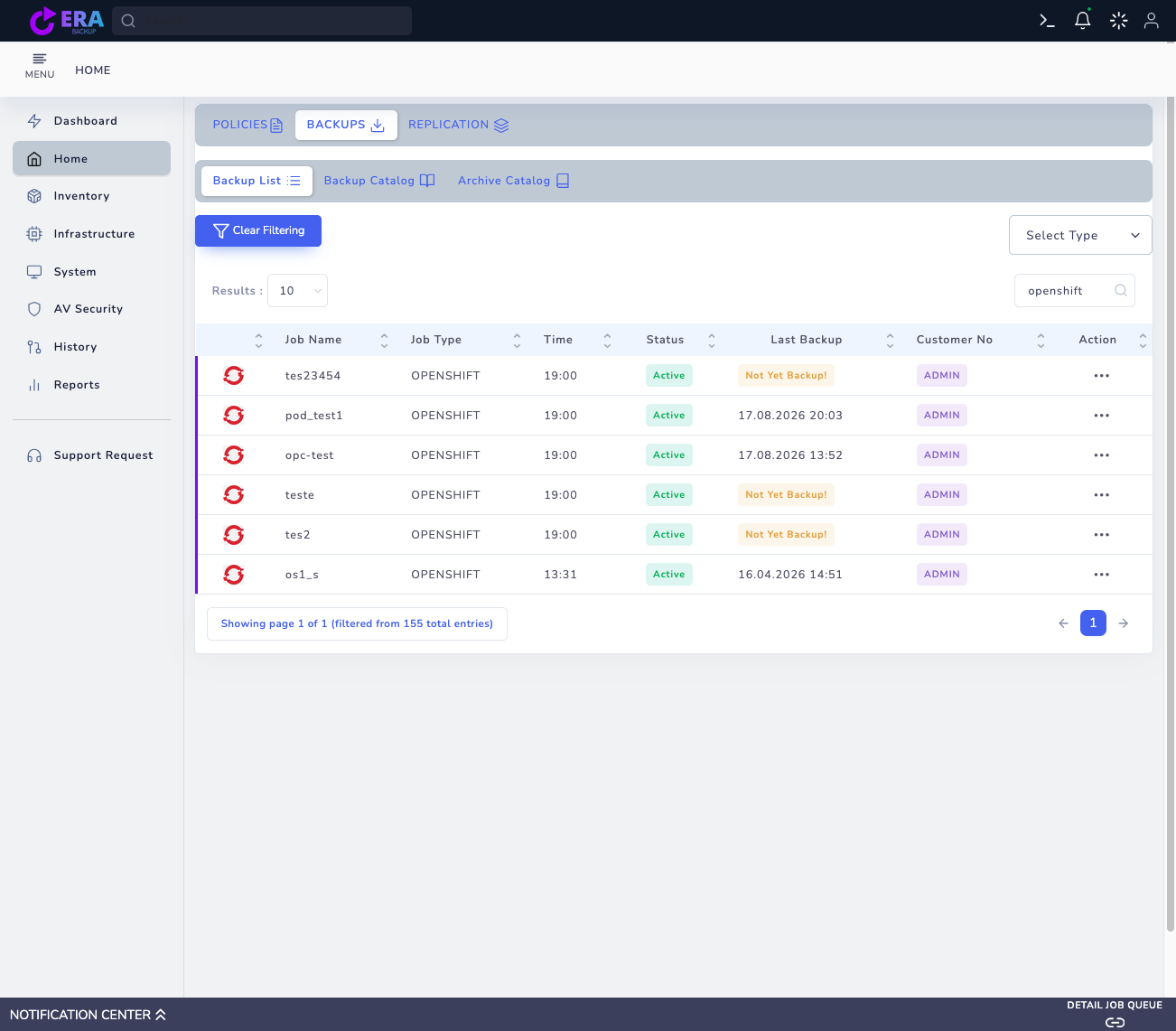
Select the OpenShift record in Home → Backups. Check source cluster, namespace, VM/Pod name and time. Do not treat KubeVirt VM, PVC and database records as the same restore type. An incremental point requires its full and incremental chain to be accessible.
Check job type and last backup date in OpenShift records. Jobs showing Not Yet Backup may not provide a recovery point. Enlarge ↗
Expected result
The selected record is identified as VM/PVC or database scope.
02
2. Select the recovery point in RESTORE
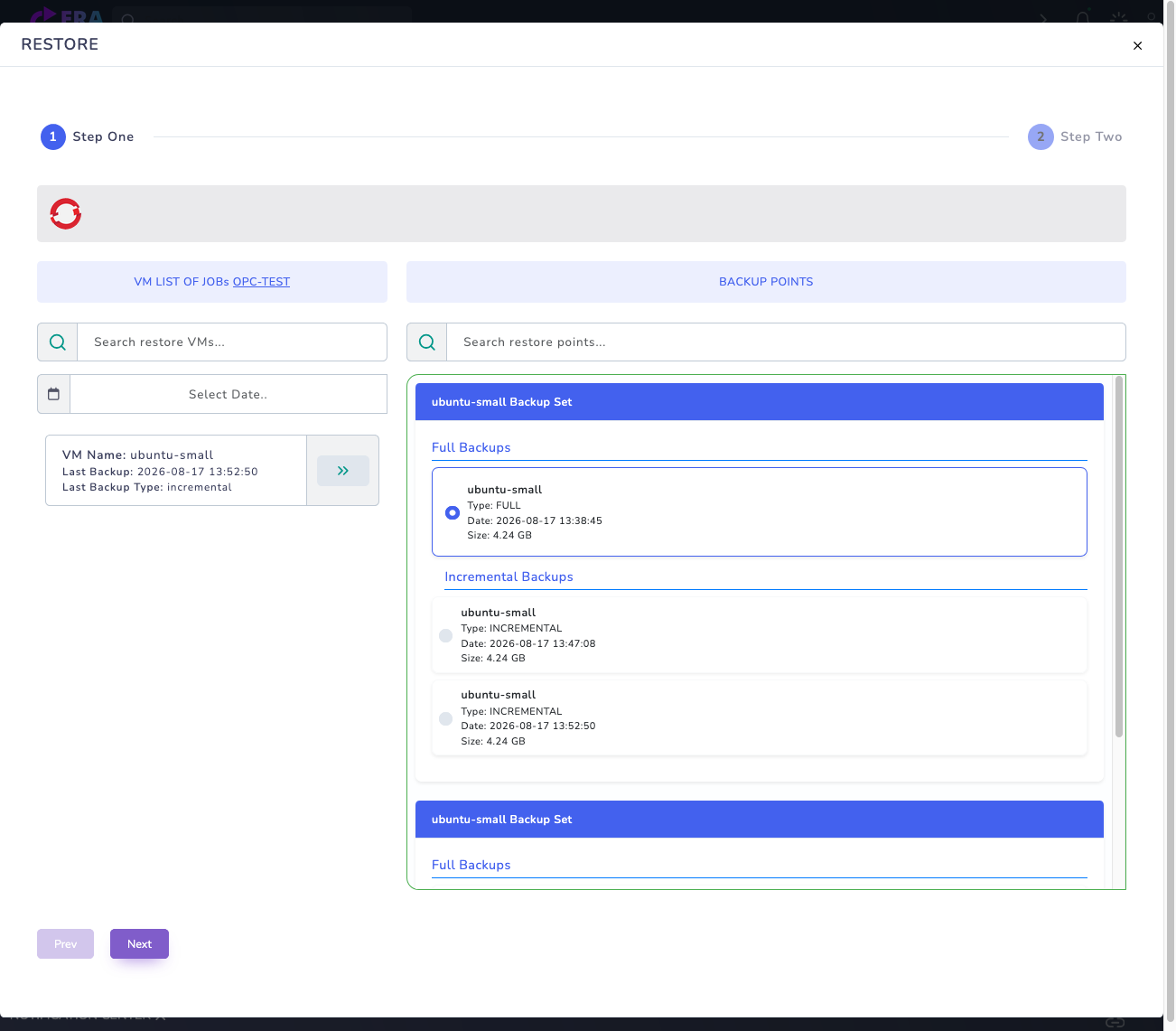
Open Step One through Action → Restore. Select the workload and inspect Full Backups and any Incremental Backups. Choose the required record and continue with Next. A listed record does not prove live cluster access or atomic recovery of all disks.
Catalog Full and Incremental points for ubuntu-small. The catalog was viewed without a live cluster connection. Enlarge ↗
Expected result
The selected time and workload are carried into target selection.
03
3. Choose target namespace, VM name and StorageClass
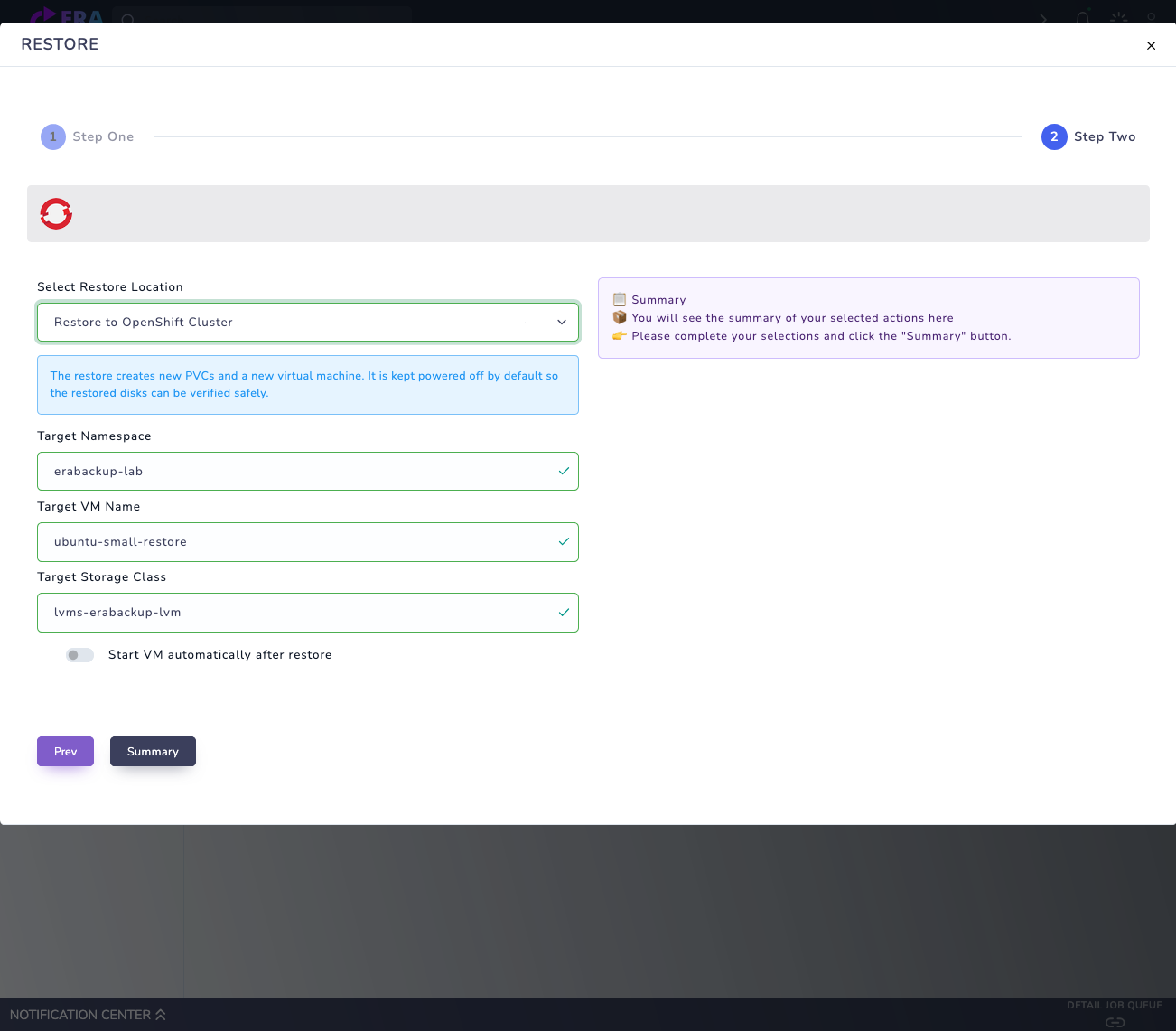
For the VM workflow, use Restore to OpenShift Cluster and review Target Namespace, Target VM Name and Target Storage Class. Use a unique test VM name. Prepare namespace, resource quotas, permissions, storage support and application dependencies in advance.
Restore to OpenShift Cluster: Target Namespace, Target VM Name and Target Storage Class. Automatic startup is off. Restore was not submitted; target connectivity must be verified separately. Enlarge ↗
Expected result
Target namespace and storage scope are clearly distinguished from the source workload.
04
4. Check automatic startup and data scope
Keep Start VM automatically after restore disabled for the first VM test. Review the PVC/disk set and version-specific VM metadata scope. For a database record, instead enter Target Service/Host, Port, Target Database, username and Secret references; use an empty target database unless overwrite is intended.
Expected result
Startup behavior and data to preserve at the target are clear before execution.
05
5. Review Summary and final confirmation
Compare backup type, source name, time, target namespace, VM name and StorageClass in Summary. Stop for a wrong cluster, naming conflict or database overwrite risk. After validating the live API and repository data path, submit Restore only for the approved test target.
Expected result
One restore operation is created for the approved test target.
06
6. Monitor Job, PVC and VM state
Compare the EraBackup notification result with OpenShift Job and PVC state. For VM recovery, verify the new PVCs are ready and the VM is stopped if auto-start is disabled. Inspect events and task records rather than repeatedly submit to a Pending or failed target. For databases, also check the target service and native restore result.
Command example
oc -n <TARGET_NAMESPACE> get jobs,pvc,vm
oc -n <TARGET_NAMESPACE> get events --sort-by=.lastTimestamp
Expected result
Job results are consistent with target resource state.
07
7. Document isolated application acceptance
Start the VM under control on an approved test network, or connect to the target database. Validate test files, table counts, services and dependencies. Record namespace, StorageClass, product/cluster versions, recovery point and outcome. This test does not replace acceptance for cluster control plane/etcd, all Secrets or external services.
Expected result
Workload-level data and application acceptance is documented.
COMMON QUESTIONS
Does this recover the entire OpenShift cluster?
No. VM/PVC or database restore differs from cluster control plane disaster recovery. etcd, Secrets and external dependencies require a separate version-compatible recovery plan.