Encryption addresses confidentiality; WORM addresses modification/deletion protection for a defined scope and period. A policy checkbox is not end-to-end engine acceptance; validate the installed release and repository support.
Screenshots were captured from the actual lab interface on 16 October 2026. The interface is in English; explanations follow your selected language. Resource names, dates and settings are examples; use values for your own environment.
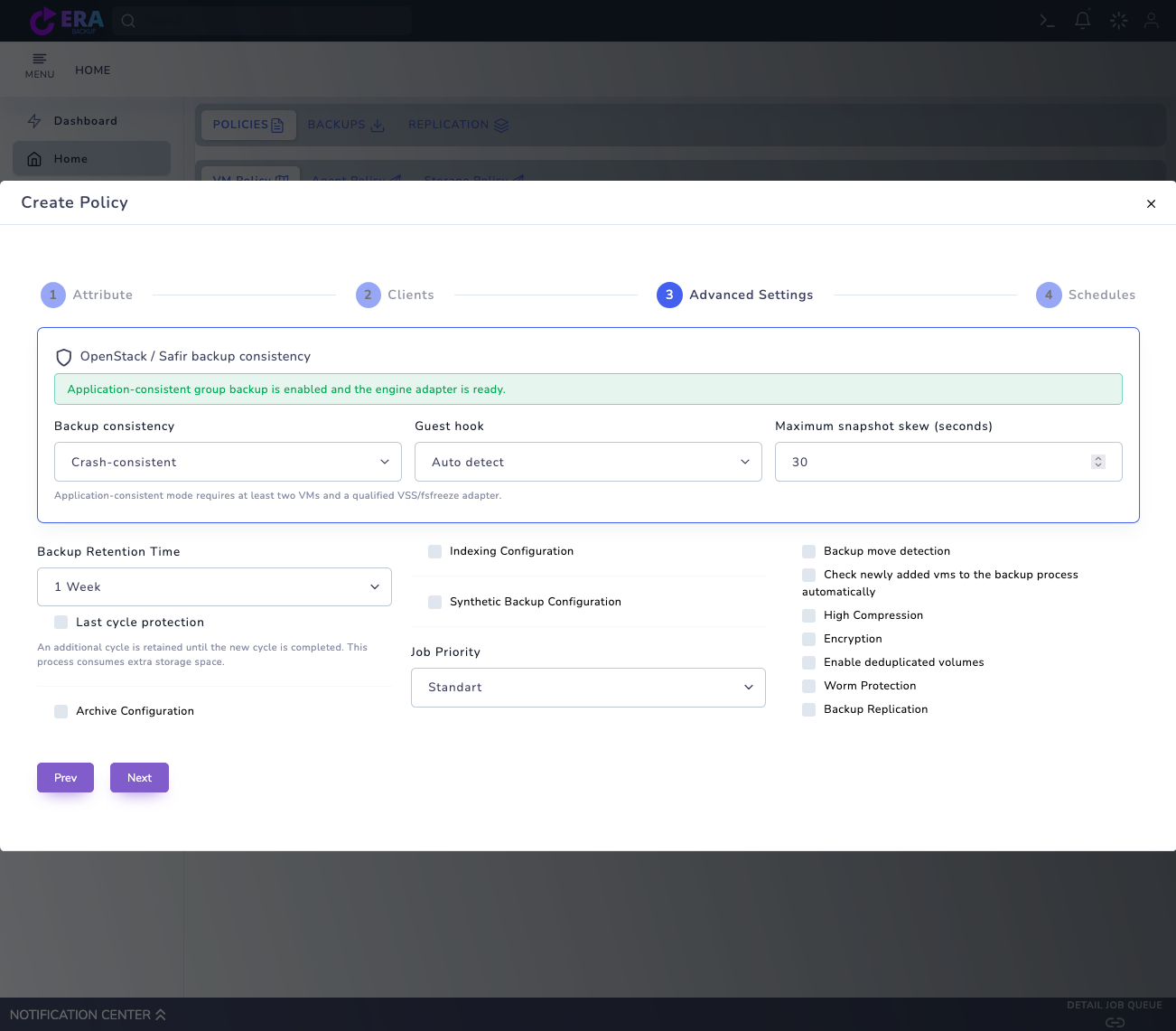
Visual note: the earlier real VM Advanced Settings screen is reused. Encryption and Worm Protection fields are visible; an unsaved lab draft is not operational acceptance. No settings, keys or protection periods were changed, and no backup/restore or deletion test was run while preparing this guide.
Installed release, engine and repository identity
Access, key and recovery owners
Isolated test data and acceptance plan
Catalog evidence and restore verification
01
1. Identify the encryption layer
Separate TLS transport protection, repository/OS disk encryption and backup payload encryption. One active layer does not establish another. Record the platform, engine, repository and release.
Expected result
The protected data and encryption layer are identified.
02
2. Verify release support
OPEN_WORK_ITEMS_20261006 marks customer-managed AES-256-GCM backup encryption as design approved, implementation pending. Do not treat the encryption-v1 design as available in the installed release; require release and engine acceptance evidence.
Expected result
Design intent is separated from installed product support.
03
3. Match Encryption to the backup method
The Encryption field in VM Policy Advanced Settings submits an encryption boolean. This interface alone does not prove an algorithm, key source or encrypted writes. Confirm support before changing a production policy based on this screen.
Real VM Policy Advanced Settings screen with Encryption and Worm Protection options. This is an earlier unsaved lab draft, not evidence of encrypted data or backend immutability acceptance. Enlarge ↗
Expected result
The visible option is matched to engine evidence.
04
4. Plan key ownership and access
For a supported solution, assign key ownership, access, storage and emergency recovery responsibility. KMS/Vault or systemd credential references in the design are not proof of an available integration. Never put passwords or private keys in guides, command lines, logs or demo forms.
Expected result
Key access and recovery ownership are documented.
05
5. Check Full and incremental chain compatibility
Validate key rotation, access to keys for older chains and cross-release restore compatibility. The design proposes a new data key per Full chain; do not assume production implementation. A policy change does not imply automatic re-encryption of older backups.
Expected result
Recovery requirements for old and new chains are recorded.
06
6. Plan isolated acceptance tests
For verified support, plan Full/incremental restore, hash and application checks using small isolated data. Rejection of a wrong key before target writes and detection of a modified chunk are design acceptance criteria, not tests passed in this work. Never corrupt a real backup for testing.
Expected result
Positive and negative acceptance scenarios are prepared.
07
7. Complete recovery evidence and operations
Record the tested release, method, key reference identifier and restore result with secret values removed. Escalate recovery risk if keys are unavailable. Validate TLS certificates and repository access separately; encryption does not replace WORM or backup copies.
Expected result
A recovery acceptance record without secrets is produced.
COMMON QUESTIONS
Does the Encryption option prove AES-256-GCM support?
No. The inspected form submits a boolean; the customer-managed flow is documented as implementation pending. Installed-release support and end-to-end acceptance need separate verification.