CLUSTER USER GUIDE

Recover layers in the right order.
Accept management and data separately.

Prepare separate source, target and acceptance checks for Rancher management restore, RKE2/K3s cluster recovery and downstream application recovery.

7 stepsTR / ENGo to steps ↓

BEFORE YOU BEGIN

Check before you begin

Rancher operator restore, distribution-specific etcd recovery and EraBackup PVC restore are different operations. This guide plans topology and acceptance; it is not an instruction to overwrite live management/etcd or automatically recover all clusters.

Screenshots were captured from the actual lab interface on 16 October 2026. The interface is in English; explanations follow your selected language. Resource names, dates and settings are examples; use values for your own environment.

Validation limit: no live Rancher management or downstream restore was tested. Shared EraBackup catalog screens are not labeled as Rancher operator output or evidence of successful Rancher-specific recovery.

  • Source layer, backup identity and release match
  • Local/downstream target separation and recovery order
  • Storage, access and required encryption material
  • Isolated testing, application data and management acceptance
01

1. Identify the record’s protection layer

Determine whether the record is Rancher operator output, a node/etcd record or a downstream PVC/database backup. Each has a different source, release and target. Do not use a backup from the wrong layer for management recovery.

Expected result

The protection layer matches the recovery method.

02

2. Match management restore to the official procedure

Use the restore/migration procedure for the installed Rancher release when recovering operator output. Prepare the target local cluster, release compatibility, storage and any required encryption material. A Kubernetes entry in EraBackup does not automatically perform an operator restore.

Expected result

Management recovery has a separate scope and owner.

03

3. Locate the downstream record in EraBackup

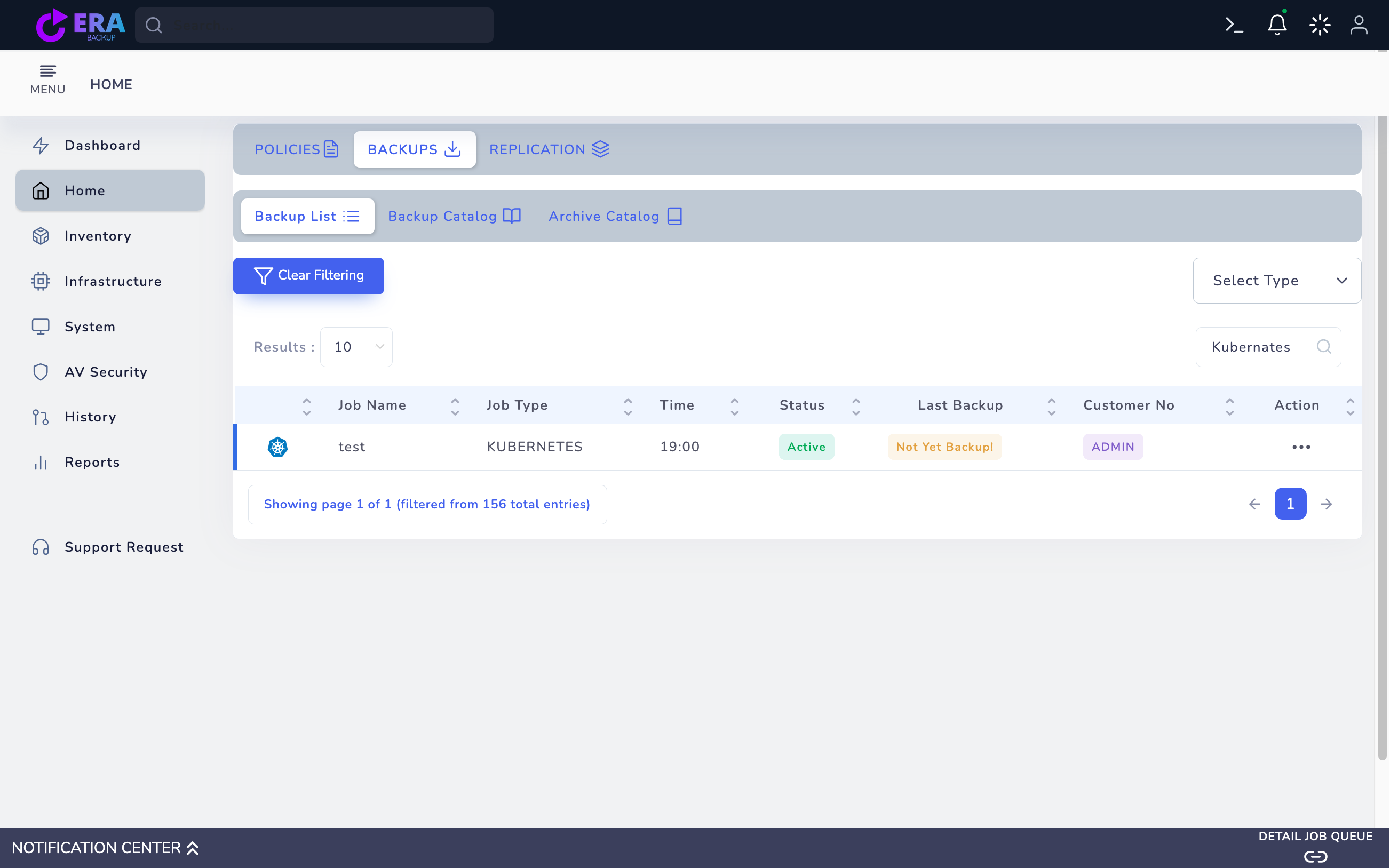
Find the correct downstream source and method in Home → Backups. Inspect item and point through Action → Restore. An RKE2 name, job name or Kubernates label alone does not prove that Rancher manages the source.

EraBackup Kubernetes method/catalog screen
Shared EraBackup Kubernetes catalog example; this job was not verified as a Rancher downstream source. A Not Yet Backup record is not restore evidence. Enlarge ↗
Expected result

The actual downstream source and point are identified.

04

4. Separate PVC targeting from etcd recovery

For a validated PVC workflow assess an isolated namespace/storage target through Different Location if offered. If an ETCD/RKE2 record offers only Original Location, do not proceed simply to test; use a distribution-specific specialist plan. Do not assume the RKE2 workflow applies to a K3s target.

Expected result

The workload target is separated from control-plane risk.

05

5. Review dependencies and target summary

Compare source/backup ID, target context, namespace, storage and application dependencies. Keep management and workload access distinct. Use the final restore only for an approved isolated application target and validated method; management recovery remains in its own procedure.

Expected result

The approved target and dependency order are recorded.

06

6. Monitor management visibility and resource health separately

Assess Rancher management access and downstream connection state separately from Pod/PVC and application data acceptance. A cluster appearing in the console does not prove its data was recovered. Avoid repeatedly resubmitting failed recovery to the same target.

Expected result

Management visibility and data health are assessed separately.

07

7. Document acceptance evidence for each layer

Separately validate management login, downstream resource health, test file/database queries and dependency access. Record releases, backup ID, target and duration. Successful management backup is not downstream data recovery or complete Rancher DR success.

Expected result

Actual results are documented for each layer.

COMMON QUESTIONS

Is recovery complete when the management console opens?

No. Downstream application data and dependencies require separate acceptance.

STEP-BY-STEP GUIDES

From installation to recovery.

01

Installation Guide

Install EraBackup Master: operating system readiness, package integrity, terminal installer, TLS, licensing, repository and service validation.

Open guide
02

First Backup

Use EraBackup Create Policy to select source, storage, clients, retention and schedule, then validate the first full backup and recovery point.

Open guide
03

Restore

Select a recovery point in EraBackup, use the RESTORE wizard, review target mappings and Summary, and validate data in an isolated target.

Open guide
04

VMware Backup

Prepare VMware backup step by step, from vCenter connectivity and test VM selection to HotAdd prerequisites and the full/CBT chain.

Open guide
05

VMware Restore

Plan VMware recovery point selection, target vSphere resources and datastore checks, then validate recovery in a new isolated VM.

Open guide
06

OpenShift Backup

Plan OpenShift Virtualization/KubeVirt VM backups with namespace, CSI, RBAC and repository prerequisites; assess database profiles separately.

Open guide
07

OpenShift Restore

Plan the OpenShift recovery point, target namespace, new VM name and StorageClass; distinguish VM/PVC recovery from database restore.

Open guide
08

Database Backup

Prepare agent-based database policies and OpenShift PostgreSQL/MySQL logical streaming separately; check source, method, retention and initial backup acceptance.

Open guide
09

Database Restore

Prepare recovery point, target database, credential reference and final acceptance checks according to the engine and backup method.

Open guide
010

Exchange Backup

Prepare the Exchange agent, registered instance, database selection and backup acceptance plan. Check which release validates DAG, database and mailbox objectives.

Open guide
011

Exchange Restore

Inspect the Exchange catalog item, recovery point and mailbox selection screen; distinguish a UI preview from an actually completed recovery operation.

Open guide
012

Active Directory Backup

Prepare the AD agent, domain controller source, policy selection and catalog acceptance; distinguish object recovery from System State and forest recovery objectives.

Open guide
013

Active Directory Restore

Prepare the AD catalog point, object identity, attribute difference and scoped restore delegation; assess Recycle Bin and System State objectives separately.

Open guide
014

Kubernetes Backup Guide

Prepare EraBackup Kubernetes agent policies, PVC/Pod selection and node/control-plane methods for your distribution; plan catalog and isolated restore acceptance together.

Open guide
015

Kubernetes Restore Guide

Inspect Kubernetes catalog records, PVC targets and control-plane recovery limits separately; verify source/namespace mapping and application acceptance.

Open guide
016

Rancher Backup Preparation Guide

Separate Rancher local management, RKE2/K3s and downstream application scope; distinguish the EraBackup agent method from Rancher’s own backup operator.

Open guide
017

Rancher Restore Preparation Guide

Prepare separate source, target and acceptance checks for Rancher management restore, RKE2/K3s cluster recovery and downstream application recovery.

Open guide
018

OpenStack Backup

Prepare OpenStack backup from VM, Cinder disk, project and consistency profile through the Full/incremental chain.

Open guide
019

OpenStack Restore

Plan OpenStack VM restore with recovery point, disk chain, metadata and target project/network mappings.

Open guide
020

Safir Bulut Backup

Prepare Safir Bulut backup from VM, Cinder disk, project and consistency profile through the Full/incremental chain.

Open guide
021

Safir Bulut Restore

Plan Safir Bulut VM restore with recovery point, disk chain, metadata and target project/network mappings.

Open guide
022

Hyper-V Backup Guide

Prepare Hyper-V backup with source connection, VM/disk selection, retention and initial acceptance checks.

Open guide
023

Hyper-V Restore Guide

Plan recovery point, disk chain and Hyper-V targets within the scope exposed by the source template.

Open guide
024

Proxmox Backup Guide

Prepare Proxmox backup with source connection, VM/disk selection, retention and initial acceptance checks.

Open guide
025

Proxmox Restore Guide

Plan recovery point, disk chain and Proxmox targets within the scope exposed by the source template.

Open guide
026

KVM Backup Preparation Guide

KVM Backup Preparation Guide: assess releases, source access and validated target scope.

Open guide
027

KVM Restore Preparation Guide

KVM Restore Preparation Guide: assess releases, source access and validated target scope.

Open guide
028

Sangfor Backup Preparation Guide

Sangfor Backup Preparation Guide: assess releases, source access and validated target scope.

Open guide
029

Sangfor Restore Preparation Guide

Sangfor Restore Preparation Guide: assess releases, source access and validated target scope.

Open guide
030

Windows File Backup

Prepare file and folder selection, agent access, repository, retention and initial acceptance for Windows servers step by step.

Open guide
031

Windows File Restore

Prepare recovery points, file selection, target paths and data acceptance for Windows servers step by step.

Open guide
032

Linux File Backup

Prepare file and folder selection, agent access, repository, retention and initial acceptance for Linux servers step by step.

Open guide
033

Linux File Restore

Prepare recovery points, file selection, target paths and data acceptance for Linux servers step by step.

Open guide
034

Windows Bare Metal Image Backup

Prepare Windows Bare Metal image backup with agent access, disk scope, boot dependencies and a recovery test.

Open guide
035

Windows Bare Metal Image Restore

Prepare Windows Bare Metal image recovery points, destination disks, recovery environment and boot/data acceptance.

Open guide
036

Linux Bare Metal Image Backup

Prepare Linux Bare Metal image backup with agent access, disk scope, boot dependencies and a recovery test.

Open guide
037

Linux Bare Metal Image Restore

Prepare Linux Bare Metal image recovery points, destination disks, recovery environment and boot/data acceptance.

Open guide
038

Replication Guide

Prepare replication acceptance with site mappings, the first Full seed, incremental generations and a verified checkpoint.

Open guide
039

Disaster Recovery Guide

Prepare service recovery with checkpoint selection, isolated testing, fencing, controlled failover and failback planning.

Open guide
040

NAS Backup

Prepare source/destination roles, Storage Policy scope and data acceptance for NAS.

Open guide
041

NAS Restore

Prepare catalogs, recovery chains, destination effects and file acceptance for NAS.

Open guide
042

S3-Compatible Object Storage Backup

Prepare source/destination roles, Storage Policy scope and data acceptance for S3-Compatible Object Storage.

Open guide
043

S3-Compatible Object Storage Restore

Prepare catalogs, recovery chains, destination effects and file acceptance for S3-Compatible Object Storage.

Open guide
044

SQL Server Backup

Prepare SQL Server agent access, instance/database selection, method and initial backup acceptance.

Open guide
045

SQL Server Restore

Prepare SQL Server recovery points, chains, destination instances and application acceptance step by step.

Open guide
046

Oracle Backup

Prepare Oracle agent access, instance/database selection, method and initial backup acceptance.

Open guide
047

Oracle Restore

Prepare Oracle recovery points, chains, destination instances and application acceptance step by step.

Open guide
048

PostgreSQL Backup

Validate PostgreSQL methods, instance/database scope and initial data acceptance.

Open guide
049

PostgreSQL Restore

Validate PostgreSQL methods, instance/database scope and destination chains.

Open guide
050

MySQL Backup

Validate MySQL methods, instance/database scope and initial data acceptance.

Open guide
051

MySQL Restore

Validate MySQL methods, instance/database scope and destination chains.

Open guide
052

MariaDB Backup

Prepare MariaDB instances, methods, data scope and initial acceptance.

Open guide
053

MariaDB Restore

Prepare MariaDB recovery points, log chains and validated destination effects.

Open guide
054

MongoDB Backup

Prepare MongoDB instances, methods, data scope and initial acceptance.

Open guide
055

MongoDB Restore

Prepare MongoDB recovery points, log chains and validated destination effects.

Open guide
056

DB2 Backup

Prepare DB2 instance, database/tablespace, methods and initial backup acceptance.

Open guide
057

DB2 Restore

Prepare DB2 instance, database/tablespace, recovery chains and destination acceptance.

Open guide
058

Repository Installation Guide

Use repository identity, HTTPS access, capacity and verified data acceptance to prepare installation.

Open guide
059

Storage Management Guide

Use repository identity, HTTPS access, capacity and verified data acceptance to manage storage operations.

Open guide
060

Monitoring Guide

Prepare scope, state verification and operational acceptance for monitoring step by step.

Open guide
061

Reporting Guide

Prepare scope, state verification and operational acceptance for reporting step by step.

Open guide
062

Notification Management Guide

Prepare scope, state verification and operational acceptance for notification management step by step.

Open guide
063

User Management Guide

Validate identity, role/group and tenant/resource boundaries for user management.

Open guide
064

Role Management Guide

Validate identity, role/group and tenant/resource boundaries for role management.

Open guide
065

Permission Management Guide

Validate identity, role/group and tenant/resource boundaries for permission management.

Open guide
066

LDAP / Active Directory Integration Guide

Validate LDAP connectivity, directory users and tenant/role mappings separately.

Open guide
067

Two-Factor Authentication Guide

Assess email OTP, expiry and sign-in-path exceptions through an acceptance plan.

Open guide
068

Troubleshooting Guide

Assess symptoms, job identity, services and data acceptance step by step to diagnose issues.

Open guide
069

Log Analysis Guide

Assess symptoms, job identity, services and data acceptance using timelines and redacted logs.

Open guide
070

License Management Guide

Prepare identity, package/scope and post-action acceptance for license management.

Open guide
071

Version Upgrade Guide

Prepare identity, package/scope and post-action acceptance for version upgrade.

Open guide
072

Backup Scheduling Guide

Plan source, method, capacity and data acceptance together for backup scheduling.

Open guide
073

Retention Policies Guide

Plan source, method, capacity and data acceptance together for retention policies.

Open guide
074

Deduplication Guide

Assess deduplication layers, policy selections and measured data acceptance separately.

Open guide
075

Compression Guide

Assess compression layers, policy selections and measured data acceptance separately.

Open guide
076

Encryption Guide

Assess encryption layers, release support, key ownership and restore acceptance step by step.

Open guide
077

WORM Protection Guide

Validate the WORM option, repository requirements, protection period and catalog evidence separately.

Open guide
078

Backup Validation Guide

Assess job records, recovery chains and isolated restores using measurable acceptance steps.

Open guide
079

Integrity Check Guide

Review hash comparisons, repository chains and backend verification limits step by step.

Open guide
080

Bandwidth Management Guide

Manage transfer scheduling, concurrency and network impact through measurable steps.

Open guide
081

Performance Optimization Guide

Assess source, network, repository and concurrency effects through controlled comparisons.

Open guide
082

Agent Installation Guide

Prepare Windows and Linux components, secure enrollment requirements and initial connectivity acceptance step by step.

Open guide
083

Agent Management Guide

Manage agent inventory, connectivity health, updates and retirement conditions through controlled steps.

Open guide
084

API Usage Guide

Prepare integration requirements, the support process and secure test acceptance without exposing technical secrets.

Open guide
085

Automation Guide

Combine scheduled jobs, error behavior, monitoring and rollback in a secure automation plan.

Open guide
086

Audit Records Guide

Prepare event scope, time correlation and secure evidence sharing step by step.

Open guide
087

Security Management Guide

Assess access, updates, data protection and incident handling without publishing sensitive configuration.

Open guide
088

Multi-Site Guide

Plan site roles, data copies, connectivity impact and recovery acceptance through controlled steps.

Open guide
089

Centralized Management Guide

Assess inventory, access boundaries, job tracking and centralized operational acceptance step by step.

Open guide
090

Archiving Guide

Assess archival needs, target support, data scope and recovery requirements step by step.

Open guide
091

Long-Term Retention Guide

Plan retention needs, chain dependencies, continued access and periodic recovery acceptance.

Open guide
092

Multi-Tenancy Guide

Assess tenant separation, resource ownership and access boundaries through controlled acceptance.

Open guide
093

Tenant Management Guide

Plan tenant onboarding, user/resource mappings and retirement acceptance safely.

Open guide
094

Capacity Planning Guide

Assess data volume, change rate, retention chains and safe capacity headroom together.

Open guide
095

Scaling Guide

Measure storage and processing load separately to prepare supported expansion and acceptance plans.

Open guide
096

High Availability Guide

Assess service dependencies, support scope and controlled failover acceptance separately.

Open guide
097

Load Balancing Guide

Assess access traffic, health checks and job concurrency against the supported architecture.

Open guide

TALK TO THE TECHNICAL TEAM

Let’s validate your cluster scope together.

Share your workloads and recovery objectives. Let’s define the technical scope together.

Technical Discussion

MEET ERABACKUP

Let’s assess your infrastructure.

Share your workloads to start a demo and technical scope discussion.

Your information is processed to assess your request. Read our privacy notice.

Google reCAPTCHA helps prevent spam. Google’s Privacy Policy and Terms of Service apply.