Task state, notification delivery, report summaries and actual recovery acceptance are assessed separately. Validate fields, permissions and supported report/notification types against the installed release.
Screenshots were captured from the actual lab interface on 16 October 2026. The interface is in English; explanations follow your selected language. Resource names, dates and settings are examples; use values for your own environment.
Visual/acceptance limit: content is based on local UI/backend contracts and technical documents. No new Dashboard/Reports/Notification Center detail screen was captured. The monitoring guide’s earlier real Backup List image is only a catalog/status example, not a report or notification detail. This inspection did not start/stop tasks, generate reports, change SMTP/recipients or send email.
Tenant, platform and source/job/run identities
Date range, time and state mapping
Authorized ownership and recipient scope
Task/catalog/data acceptance evidence
01
1. Define monitored workloads and ownership
Map platform, server, policy, repository and task identities. Record the last accepted recovery point, expected run window and response owner. An active policy is not the same as a running task.
Expected result
The check result and relevant job identity are recorded.
02
2. Compare Backup List state with the catalog
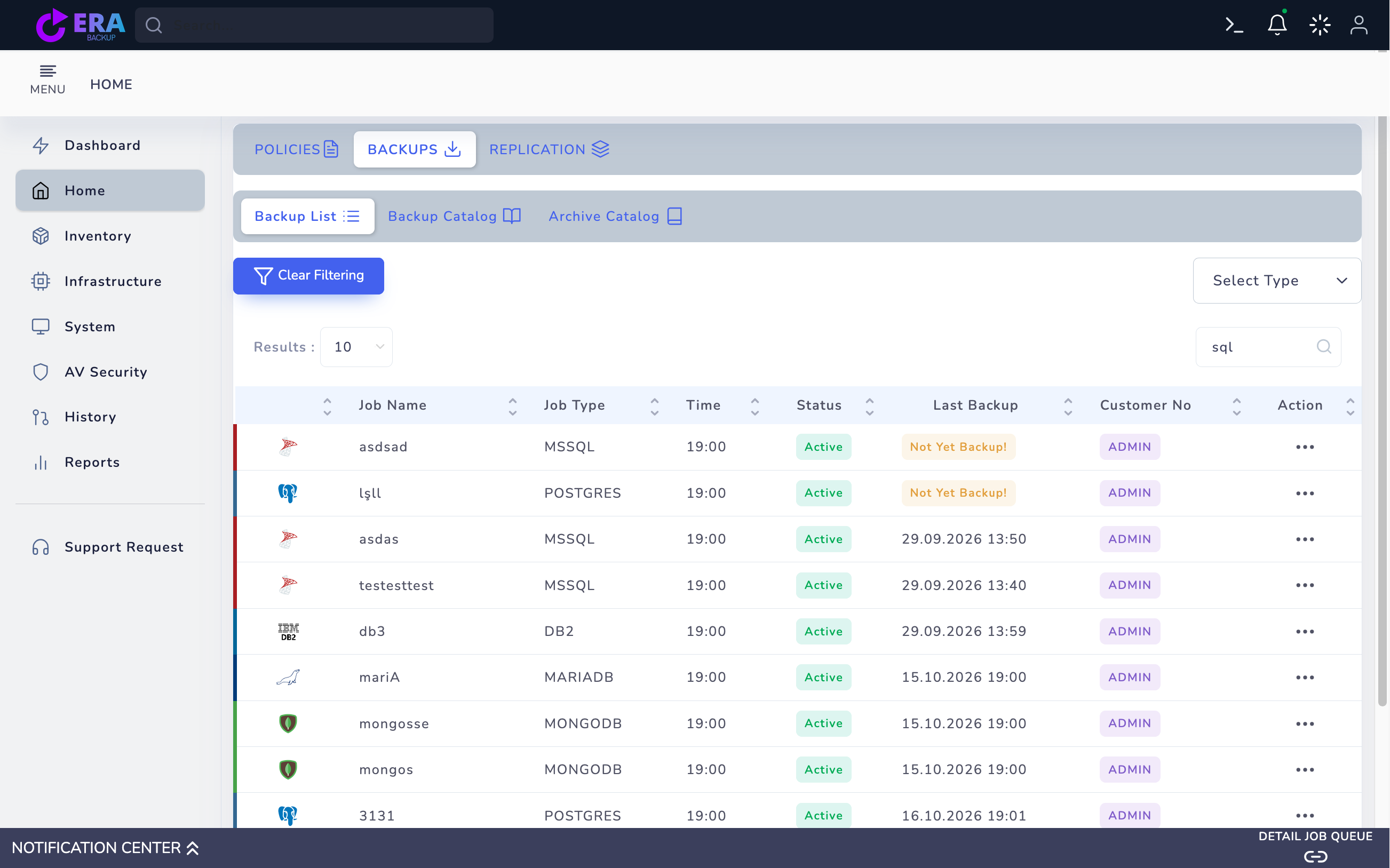
Compare Job Type, Status and Last Backup under Home → Backups → Backup List. Not Yet Backup is not a usable point. Active reflects policy/scheduling state; a historical Last Backup date does not prove current access or restore success. The image shows earlier real DB2 and other engine records.
Earlier real Backup List screen: Active, Last Backup and Not Yet Backup fields. This is not a Dashboard, Reports or Notification Center detail screen; it is a historical catalog/status example. Enlarge ↗
Expected result
The check result and relevant job identity are recorded.
03
3. Follow one run in Notification Center
In Notification Center → job detail, match policy/job identity with run/sub/backup identities. Read progress, sizes, rates, start/end times and errors for the same run. Do not treat one engine’s metrics/status codes as universal; 100 percent alone is not terminal success.
Expected result
The check result and relevant job identity are recorded.
04
4. Distinguish waiting using Queue and Process Steps
Where available, use DETAIL JOB QUEUE, job details and Process Steps to distinguish queue waits from transfer. For OpenStack/Safir application-consistent jobs inspect quiesce, snapshot barrier, snapshot, timing and resume phases. Notification delivery may be best-effort; compare signed operation results and service logs.
Expected result
The check result and relevant job identity are recorded.
05
5. Separate repository and source health checks
Monitor source access, repository enabled/healthy state and reservable capacity separately. Do not assume endpoint/TLS, mount or quota failures mean disk fullness. Check last verified checkpoint age for replication and required log chains/accepted points for databases. Scheduler interval alone is not RPO.
Expected result
The check result and relevant job identity are recorded.
06
6. Escalate failures with evidence
Record first failure time, policy/run/backup identities, platform, terminal state and relevant log excerpts. Remove passwords/tokens/personal data. Do not kill/suspend or clear a queue merely because a job appears stuck; these actions may affect the data path or snapshot cleanup.
Expected result
The check result and relevant job identity are recorded.
07
7. Link monitoring to periodic restore acceptance
Report the last successful task separately from the last accepted restore test. Regularly validate data/hashes and application access with the owner. Include missing or late backup windows in alert criteria; monitoring failures alone can miss jobs that never started.
Expected result
The check result and relevant job identity are recorded.
COMMON QUESTIONS
Does a success notification replace restore acceptance?
No. Assess tasks, catalog points, actual data and application acceptance together; test email delivery separately.